

A monitor’s image quality is not determined by one specification. Panel technology, resolution, brightness, contrast, color reproduction, refresh rate, and response time all contribute to how an image looks and moves on screen. For businesses sourcing displays, understanding these technologies helps distinguish meaningful specifications from isolated marketing claims. As one of the best monitor manufacturers, we consider these elements together when developing displays for different professional, entertainment, and commercial applications.
Panel Technology Sets the Visual Foundation
The panel is the core component responsible for displaying an image. IPS, VA, and TN technologies use different approaches to control liquid crystals, resulting in different characteristics for viewing angles, color reproduction, contrast, and response behavior.
IPS panels are widely used where consistent image presentation from different viewing positions matters. Industry guidance notes that IPS technology generally provides wide viewing angles and good color reproduction, making it useful for shared viewing and applications where image consistency is important.
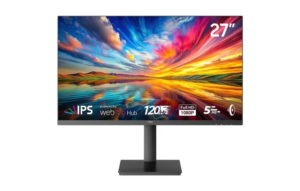
Our NPC-MF2712-K adopts an IPS panel in a 27-inch display. This configuration provides a foundation for applications where users may work, watch content, or play games from slightly different viewing positions.
Resolution Determines the Amount of Detail
Resolution describes the number of pixels used to construct an image. More pixels can provide greater image detail, but resolution should always be considered alongside screen size and viewing distance. A larger display with a relatively low resolution may not appear as detailed as a smaller display with substantially higher pixel density.
The MF2712-K has a maximum resolution of 1920 × 1080, commonly referred to as Full HD. For business buyers, Full HD can be appropriate for general office applications, web content, video, digital signage, and other mainstream workloads.
Resolution also affects system requirements. Higher-resolution displays require compatible graphics hardware and interfaces, while Full HD can provide a practical balance between image detail and hardware requirements for many everyday applications.
Refresh Rate Controls Motion Smoothness
Refresh rate indicates how many times a display can update its image each second. A 60Hz monitor refreshes the image up to 60 times per second, while a 120Hz display can refresh it up to 120 times under suitable conditions.
Our MF2712-K supports a refresh rate of up to 120Hz, giving the model a specification suited to applications where smoother motion is valuable. This can be particularly relevant to gaming, video playback, scrolling, and other content involving frequent movement.
However, refresh rate should not be evaluated independently. The source device, graphics processor, connection, resolution, and content frame rate all influence what users can actually experience. A higher specification is useful when the rest of the system can support it.
Brightness and Contrast Shape the Image
Brightness affects how clearly content can be viewed under different ambient lighting conditions. It is commonly expressed in candelas per square meter, or cd/m². Our MF2712-K is specified at 350 cd/m² brightness, providing a defined reference point for businesses comparing display configurations.
Contrast describes the relationship between the brightest and darkest portions of an image. Our model has a 1500:1 typical contrast ratio. This specification contributes to the distinction between light and dark areas, although perceived image quality also depends on panel characteristics, viewing conditions, content, and display settings.
For monitor manufacturers, balancing brightness and contrast involves more than maximizing individual figures. Power consumption, thermal management, panel characteristics, and the intended application all influence the final configuration.
Color Gamut and Color Depth Matter
Color performance is another major component of perceived display quality. Color gamut describes the range of colors a display can reproduce, while color depth relates to how many shades can be represented.
The MF2712-K provides 86% NTSC color gamut coverage and supports 16.7 million colors with 8-bit color depth. These specifications can be relevant when businesses evaluate displays for multimedia, entertainment, content consumption, and general visual applications.
For color-sensitive professional workflows, buyers may require additional information such as color accuracy, calibration performance, and coverage of specific color spaces. Consequently, monitor manufacturers and buyers should interpret gamut figures according to the actual application rather than treating one number as a universal measure of quality.
Response Time Complements Refresh Rate
Refresh rate and response time describe different aspects of motion performance. Refresh rate indicates how frequently the display can update its image, while response time describes how quickly pixels transition between states.
The MF2712-K has a 5-millisecond response time and a refresh rate of up to 120Hz. Together, these specifications make the monitor relevant to users who value responsive motion in entertainment and interactive applications.
Nevertheless, response-time measurements can depend on testing conditions and measurement methods. Buyers comparing products should therefore examine the complete specification sheet and intended use rather than relying on a single response-time figure.
Smart Features Expand Monitor Applications
Modern monitors increasingly combine conventional display functions with smart-platform capabilities. This can create additional value for distributors because a monitor may serve as both a computer display and a connected entertainment device.
Our MF2712-K incorporates the LG webOS system and the “Play all cloud games” function through the webOS Hub. It also provides access to platforms including Netflix, Amazon Prime Video, Disney+, Max, Paramount+, Spotify, Rakuten TV, and YouTube.
This combination gives businesses another way to position a 27-inch Full HD monitor for mixed-use environments. For monitor manufacturers, integrating smart functionality also requires attention to software compatibility, content services, connectivity, and the requirements of each target market.
Evaluating Displays Beyond One Specification
When comparing monitor manufacturers, business buyers should begin with the application rather than searching for the highest individual specification. Office deployments may emphasize resolution, brightness, ergonomics, and connectivity, while gaming-oriented products may place greater emphasis on refresh rate and response time.
The best purchasing decisions come from evaluating specifications as a system. Panel type affects viewing characteristics, resolution determines image detail, refresh rate influences motion, and color specifications help define visual reproduction. Brightness and contrast then contribute to how effectively the display performs under real-world conditions.
Developing Smart Monitor Solutions with NPC
At NPC, we are a technology manufacturing enterprise specializing in smart TVs, monitors, and computing products. We combine display technologies and smart functions to develop products for different market requirements. Our MF2712-K features a 27-inch IPS panel, 1920 × 1080 resolution, up to 120Hz refresh rate, 350 cd/m² brightness, 1500:1 typical contrast, 86% NTSC color gamut, and 16.7 million colors with 8-bit depth.
For businesses evaluating monitor manufacturers and sourcing smart displays for their portfolios, contact NPC to discuss monitor solutions tailored to your target market and application requirements.