

A desktop computer does not always need a separate monitor, tower, and collection of cables to deliver reliable performance. An all-in-one desktop PC combines the main computing components and display into a single unit, creating a cleaner and more compact workspace. For businesses, this design offers a balance between space efficiency, usability, and computing capability. At NPC, we consider both hardware performance and practical application needs when developing computer solutions for different users.
What Is an All-in-One Desktop PC?
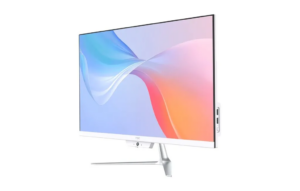
An all-in-one desktop PC integrates the motherboard, processor, storage, memory, speakers, and display into one device. Unlike traditional desktop computers that require a separate computer case and monitor, all-in-one models simplify installation and reduce the amount of equipment required on a desk.
This integrated structure makes all-in-one computers popular in environments where workspace organization matters. Offices, reception areas, educational facilities, retail counters, and home workspaces can benefit from a streamlined setup that occupies less physical space.
However, the design also creates certain limitations. Because components are integrated behind the display, upgrading individual parts may be more restricted compared with traditional desktop towers. Therefore, businesses should evaluate expected workloads and future expansion requirements before selecting a system.
Key Advantages of an Integrated Desktop Design
One of the biggest advantages of an all-in-one desktop PC is its space-saving design. By combining multiple components into one device, businesses can create cleaner workstations with fewer cables and simpler installation processes.
For companies managing multiple workstations, easier deployment can reduce setup complexity. A single integrated unit can be installed more quickly than a traditional desktop system that requires separate monitors, power connections, and peripheral arrangements.
Another benefit is appearance. The minimal design of an all-in-one computer can create a more professional environment, making it suitable for customer-facing locations such as reception desks, consultation areas, and retail spaces.
Performance Considerations for Business Applications
While compact design is important, computing performance remains a major consideration. The processor, memory, storage, and operating system determine how effectively a system handles daily workloads.
Our NPC-PF2401-D demonstrates how modern all-in-one systems can combine efficient design with practical performance. This model features an AMD Ryzen™ 5 7430U processor, 16GB SO-DIMM DDR4 memory running at 3200MHz, and a 512GB M.2 2280 SSD.
This hardware configuration supports common business activities such as document processing, online meetings, browser-based applications, multitasking, and office software. The SSD storage also provides faster system responsiveness compared with traditional hard drives, helping users access files and applications more efficiently.
Display Quality and User Experience
Because the display is integrated into the computer, screen quality is a central part of the all-in-one experience. Businesses should consider factors such as size, resolution, brightness, and viewing comfort when selecting a model.
The NPC-PF2401-D includes a 23.8-inch screen with a 1920 × 1080 resolution and a 100Hz refresh rate. This Full HD display provides a suitable balance between clarity and everyday usability for office tasks, communication, and multimedia applications.
The system also provides 230±20Lux brightness, supporting clear visibility in typical indoor environments. For organizations purchasing computers for shared workspaces or long working sessions, display comfort can be an important factor affecting user experience.
Built-In Features for Modern Work Environments
Another advantage of an all-in-one desktop PC is the ability to integrate additional features directly into the system. Built-in cameras and wireless connectivity can reduce the need for external accessories and make devices easier to deploy.
The NPC-PF2401-D includes a 5.0MP camera, supporting video communication scenarios such as online meetings and remote collaboration. It also supports optional M.2 WiFi modules with PCIe + USB & CNVi compatibility and includes Bluetooth 5.1 connectivity.
These features make the system suitable for modern workplaces where wireless connections and digital communication have become standard requirements.
Limitations Businesses Should Consider
Although an all-in-one desktop PC provides many advantages, businesses should also understand its limitations. The integrated design can make hardware upgrades more challenging compared with traditional desktop computers.
For organizations that frequently upgrade processors, graphics cards, or other internal components, a modular desktop tower may offer greater flexibility. However, for users with predictable computing needs, the simplicity of an all-in-one system can outweigh these limitations.
Another consideration is repair and maintenance. Since multiple components are combined into one structure, service processes may differ from traditional desktop systems. Businesses should therefore evaluate supplier support and product lifecycle planning before large-scale deployment.
Ideal Use Cases for All-in-One Computers
The best applications for an all-in-one desktop PC are environments that value simplicity, efficient use of space, and straightforward operation. Offices can use these systems for administrative work, customer service, and employee workstations. Schools and training centers can also benefit from their clean installation and easy management.
Retail businesses and reception areas may prefer all-in-one designs because they provide professional-looking setups without requiring large equipment footprints. In addition, home users and small businesses can use these systems when they need reliable computing without complex installation.
Choosing the right computer depends on matching specifications with actual requirements. Businesses should evaluate processing needs, storage capacity, display expectations, and future usage plans before making purchasing decisions.
Building Efficient Computing Solutions with NPC
At NPC, we are a technology manufacturing enterprise specializing in smart TVs, monitors, and computing products. We develop computer solutions that combine practical design with reliable performance for different market applications. Our NPC-PF2401-D features an AMD Ryzen™ 5 7430U processor, 16GB DDR4 memory, 512GB SSD storage, a 23.8-inch Full HD display, 5.0MP camera, Bluetooth 5.1, optional WiFi support, and Windows 11.
For businesses searching for dependable all-in-one desktop PC solutions, contact NPC today to discuss products and configurations designed for your specific application requirements.