

Choosing an all-in-one desktop computer involves more than finding a low advertised price. For business buyers, distributors, and system integrators, value depends on how the processor, memory, storage, display, camera, connectivity, operating system, and overall configuration work together. Comparing all-in-one desktop computer deals therefore requires looking beyond the initial purchase cost and considering whether the specification matches the intended workload and deployment environment.
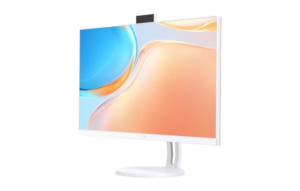
Start with the Processor and Everyday Performance
The processor is one of the first specifications buyers should examine because it influences how effectively a computer handles applications and multitasking. Microsoft’s current PC buying guidance identifies AMD Ryzen 5 and Ryzen 7 processors among options for users seeking a balance of performance and speed. It also notes that the CPU is a key component in determining a PC’s capabilities.
The NPC PF2402-D uses an AMD Ryzen™ 5 7430U processor. AMD specifies this processor with six CPU cores and 12 threads, with a maximum boost clock of up to 4.3 GHz. This configuration gives business buyers a concrete processor specification to consider when assessing an all-in-one computer for office productivity and general business applications.
Evaluate Memory and Storage Together
RAM and storage serve different purposes, so they should not be treated as interchangeable specifications. RAM provides working memory for active applications, while storage retains the operating system, programs, documents, and other files. Microsoft currently recommends 8 GB to 16 GB of RAM for many PC users, with higher capacities relevant to more demanding workloads.
The PF2402-D comes with 16GB of SO-DIMM DDR4 memory running at 3200MHz. Its storage configuration is a 512GB M.2 2280 SSD. This combination provides buyers with clearly defined memory capacity and solid-state storage rather than requiring them to assess processor performance in isolation.
For procurement teams comparing all-in-one desktop computer deals, capacity should also be considered against the deployment scenario. An office workstation handling documents and browser-based applications may have different storage needs from a shared computer used for media, databases, or larger local files.
Check the Display as Part of the Value
One advantage of an all-in-one design is that the display and computing hardware are integrated into a single product. Microsoft describes the all-in-one form factor as combining system components and the display into one chassis, reducing the space required compared with a conventional desktop setup.
The PF2402-D features a 23.8-inch display with a 1920 × 1080 resolution and a 100Hz refresh rate. Its specified brightness is 230±20 Lux. These characteristics should be assessed according to the environment in which the device will operate, whether that means an office desk, reception area, classroom, or other commercial setting.
A suitable display can contribute to usability without requiring buyers to purchase a separate monitor. This integrated approach can also simplify procurement and deployment when an organization needs complete desktop stations rather than separate system units and displays.
Consider Camera and Wireless Connectivity
Video communication has become a routine part of many business workflows, making the integrated camera another specification worth examining. The PF2402-D includes a 5.0MP camera, providing a defined hardware specification for buyers evaluating devices intended for video conferencing and remote collaboration.
Wireless connectivity can also influence installation flexibility. The PF2402-D supports an optional M.2 Wi-Fi configuration using PCIe + USB and CNVi, while Bluetooth 5.1 is specified as standard. Buyers should verify the exact configuration of each unit when wireless networking is required, particularly when purchasing different batches or customized configurations.
Operating System and Deployment Requirements Matter
Hardware specifications should be considered alongside operating-system compatibility. The PF2402-D is configured with Windows 11. Microsoft lists a 1 GHz or faster compatible 64-bit processor with at least two cores, 4GB RAM, 64GB storage, UEFI Secure Boot capability, TPM 2.0, and compatible DirectX 12 graphics among the minimum Windows 11 requirements.
The PF2402-D’s specified 16GB memory and 512GB SSD exceed those basic memory and storage thresholds. However, minimum requirements should not be confused with recommended specifications for every workload. Business buyers should still evaluate application requirements, security policies, network infrastructure, and lifecycle expectations before selecting a configuration.
Compare Total Value, Not Just the Price
The most useful comparison of all-in-one desktop computer deals considers the complete configuration rather than the lowest headline price. A lower-cost system may require additional purchases if it lacks sufficient memory, storage, camera capability, or suitable display specifications. Conversely, paying for capabilities that a particular deployment will never use may also reduce purchasing efficiency.
At NPC, we approach product configuration by bringing computing hardware and display components together in a unified desktop solution. The PF2402-D combines a 23.8-inch 1920 × 1080 display, 100Hz refresh rate, AMD Ryzen™ 5 7430U processor, 16GB DDR4 memory, 512GB M.2 2280 SSD, 5.0MP camera, Bluetooth 5.1, optional Wi-Fi capability, and Windows 11.
Building Practical Desktop Solutions with NPC
At NPC, we are a technology manufacturing enterprise specializing in smart TVs, monitors, and computing products. We develop integrated products for buyers who need practical combinations of display and computing hardware rather than disconnected components. The PF2402-D provides a defined configuration that can be evaluated according to different business deployment requirements.
For distributors, retailers, system integrators, and other business buyers comparing all-in-one desktop computer deals, contact NPC to discuss your requirements and explore a suitable computing solution for your market.