

Desktop computing no longer requires a separate tower, monitor, and collection of external components. An all-in-one computer integrates the primary computing hardware behind the display, creating a single desktop unit with a smaller physical footprint. For businesses, distributors, and technology buyers, understanding how these systems combine processing, memory, storage, display, and connectivity can make product evaluation and procurement more precise.
What Makes an All-in-One Computer Different?
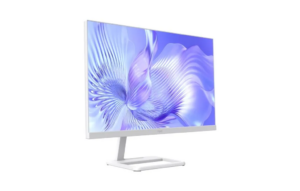
A conventional desktop normally separates the display from the computer chassis. An all-in-one computer brings these elements together, placing the core computing hardware within or behind the display enclosure. The motherboard connects major components such as the processor, memory, storage, and interfaces, allowing them to operate as one system.
This integrated design can reduce cable clutter and simplify installation. NPC’s own all-in-one PC range is positioned for work, entertainment, and learning, with different screen sizes and hardware configurations available for different applications.
For all-in-one computer manufacturers, this design also creates engineering considerations that differ from traditional desktops. Space, thermal management, component placement, power delivery, and serviceability all need to be considered within a more compact enclosure.
The Processor Handles the Core Computing Work
The central processing unit, or CPU, executes instructions and coordinates many of the computer’s operations. Its architecture, core count, clock speeds, and power characteristics influence how efficiently the system can handle applications and multitasking.
Our NPC-PF2413-D uses an AMD Ryzen™ 5 6600H processor. AMD specifies this processor with six CPU cores and 12 threads, a 3.3GHz base clock, and up to 4.5GHz boost clock. The processor also has a default 45W TDP, making it a capable foundation for an all-in-one desktop configuration.
Memory and Storage Keep Applications Moving
RAM provides temporary working space for active applications and data, while storage retains the operating system, applications, and user files after the computer is switched off. More memory can help when multiple programs and browser tabs are running simultaneously, while faster solid-state storage can support responsive system startup and file access.
The NPC-PF2413-D is configured with 16GB SO-DIMM DDR4 memory at 3200MHz and a 512GB M.2 2280 SSD. This combination provides a practical configuration for office productivity, business applications, browsing, and general desktop workloads.
The Display Is Part of the Computing System
One of the defining characteristics of an all-in-one computer is that its display and computing hardware are designed as a single product. This can make the system easier to position in offices, reception areas, classrooms, and other environments where desktop space matters.
Our NPC-PF2413-D features a 23.8-inch display with 1920×1080 resolution and a 100Hz refresh rate. Its brightness is specified at 230±20 Lux. The 23.8-inch format also aligns with NPC’s positioning of this size as a balanced option for many home and office users.
Connectivity Extends the System’s Functionality
Although the main components are integrated, an all-in-one PC still needs to communicate with networks, peripherals, and other devices. Wireless connectivity, Bluetooth, cameras, and external interfaces can therefore influence how suitable a model is for particular business environments.
The NPC-PF2413-D includes Bluetooth 5.1 and provides an M.2 Wi-Fi slot supporting PCIe+USB and CNVi configurations as an optional feature. It also incorporates a 5.0MP camera, which can support video communication and other camera-based applications.
For all-in-one computer manufacturers, integrating these functions requires coordination between the motherboard, wireless modules, camera hardware, operating system, and enclosure design.
Why Windows 11 Matters in Business Deployment
The operating system provides the software environment through which the hardware becomes a usable computer. Windows 11 supports modern PC configurations and requires, among other things, a compatible 64-bit processor, at least 4GB of RAM, 64GB of storage, UEFI Secure Boot capability, and TPM 2.0.
The NPC-PF2413-D runs Windows 11 and exceeds Microsoft’s minimum memory and storage requirements with its 16GB RAM and 512GB SSD configuration. For business buyers, operating-system compatibility should nevertheless be evaluated together with software requirements, security policies, peripheral compatibility, and deployment needs.
Design Efficiency Creates Practical Business Benefits
The integrated architecture can simplify the physical setup of a workstation because the computer and display occupy a single footprint. This can be useful where desk space is limited or where businesses want a cleaner installation across multiple workstations.
For distributors and OEM buyers, the all-in-one format can also simplify product positioning. Rather than selling a separate desktop tower and monitor as two primary components, an integrated system provides a single product configuration with coordinated hardware.
At NPC, we develop all-in-one computers alongside smart TVs, monitors, and other computing products. Our NPC-PF2413-D combines a 23.8-inch FHD 100Hz display, AMD Ryzen™ 5 6600H processor, 16GB DDR4 memory, 512GB M.2 SSD, 5.0MP camera, Bluetooth 5.1, optional Wi-Fi capability, and Windows 11 in one desktop platform.
Choosing an Integrated PC for the Right Application
Selecting an all-in-one PC should begin with the intended workload rather than a single specification. Office users may prioritize processor performance, memory, storage, display quality, and connectivity, while shared environments may place greater importance on compact installation and integrated cameras.
For all-in-one computer manufacturers, this application-focused approach helps balance performance, physical design, component selection, and market requirements. For distributors and business buyers, it provides a clearer basis for comparing configurations and building product portfolios around real customer needs.
At NPC, we combine computing hardware and integrated display design to provide practical solutions for modern workspaces and commercial applications. Our NPC-PF2413-D demonstrates how processing, memory, storage, display, camera, wireless connectivity, and Windows 11 can be brought together in one compact system. Contact NPC today to discuss all-in-one PC configurations suited to your market, applications, and sourcing requirements.