

Modern displays have become essential tools for workplaces, creative industries, entertainment environments, and professional applications. Although users interact with screens every day, the technology behind image creation involves several precise processes, including backlight control, liquid crystal alignment, color filtering, and pixel management. Understanding these fundamentals helps businesses evaluate display solutions more effectively.
LCD monitors remain widely used because they offer reliable performance, flexible designs, and compatibility with different professional applications. When organizations compare products from LCD monitor manufacturers, they need to consider not only screen size but also panel technology, color accuracy, resolution, refresh rate, connectivity, and installation options.
How LCD Panels Transform Electrical Signals into Images
LCD, or Liquid Crystal Display, creates images by controlling how light passes through liquid crystal layers. Unlike self-emissive display technologies, LCD panels require a backlight system to illuminate the screen. The liquid crystal layer does not produce light itself; instead, it adjusts light transmission to create different levels of brightness.
Each LCD screen consists of millions of small pixels. Every pixel contains sub-pixels that typically represent red, green, and blue colors. By controlling these three color components at different intensities, the display can reproduce a wide range of colors and create detailed images.
The process begins when the monitor receives digital image data from a connected device. The display controller processes these signals and determines how each pixel should behave. The liquid crystal molecules then adjust their alignment, allowing different amounts of backlight to pass through and form the final image visible to the viewer.
The Role of LCD Panel Types in Image Quality
Panel technology has a significant influence on viewing experience. Different LCD panel types are designed to balance factors such as color reproduction, response speed, viewing angles, and contrast performance.
IPS (In-Plane Switching) panels are commonly used in professional monitors because they provide wide viewing angles and consistent color performance. These characteristics make IPS displays suitable for designers, photographers, engineers, and other users who require accurate visual representation.
When businesses evaluate solutions from LCD monitor manufacturers, panel type should match the intended application. A monitor designed for general office work may prioritize efficiency and comfort, while a professional design monitor requires stronger color accuracy and wider color coverage.
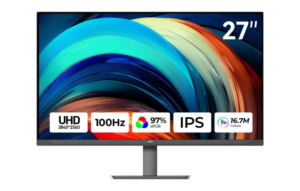
At NPC, we develop professional display solutions that address different working requirements. Our NPC-MU2707-K is a 27-inch Ultra HD professional monitor designed for users who need detailed images and reliable color performance. It features an IPS panel structure and supports a 3840×2160 resolution for sharp visual output.
Resolution and Color Accuracy Define Professional Displays
Resolution determines how much visual information a monitor can display. Higher resolutions provide more pixels, allowing users to view finer details and work with larger content areas. For professional applications such as graphic design, video editing, and engineering visualization, resolution is an important factor in productivity.
Color performance is another key consideration. Professional users often require displays that can reproduce colors accurately across different workflows. Color gamut specifications indicate the range of colors a monitor can display, helping buyers compare whether a product meets their creative or technical requirements.
The NPC-MU2707-K supports a 97% sRGB color gamut and DCI-P3 color gamut compatibility. These features help provide a broader color range for professional visual tasks. The monitor also supports HDR10, allowing compatible content to present improved brightness and contrast details.
Refresh Rate and Connectivity Support Modern Workflows
Although refresh rate is often associated with gaming displays, it also influences general usability. A higher refresh rate can create smoother movement when scrolling through content, navigating interfaces, or working with dynamic visual materials.
The NPC-MU2707-K supports a maximum refresh rate of 100Hz, providing users with smoother screen transitions compared with traditional lower-refresh-rate monitors. For professional environments, this specification can contribute to a more comfortable viewing experience during extended usage.
Connectivity is also essential for workplace flexibility. Modern monitors often need to connect with computers, laptops, cameras, and other devices. The NPC-MU2707-K is equipped with DisplayPort and HDMI interfaces, allowing compatibility with various professional setups. It also supports the VESA standard for flexible mounting solutions.
Choosing the Right LCD Monitor for Business Applications
For businesses purchasing monitors, the selection process should focus on overall application needs rather than individual specifications. Factors such as workspace environment, user roles, content requirements, and future expansion plans all influence the ideal display choice.
Office teams may prioritize comfortable viewing and productivity features, while creative departments may focus on resolution and color accuracy. Industrial and commercial applications may require specific mounting options, connectivity, or long-term reliability.
Reliable LCD monitor manufacturers should provide products with clear specifications and solutions that support different industries. By understanding how LCD technology works, buyers can better evaluate whether a monitor meets their operational requirements.
Advancing Professional Display Solutions with NPC
LCD technology continues to evolve as businesses demand more precise, efficient, and versatile visual solutions. From image processing to panel design, every component contributes to the final viewing experience. Selecting the right display requires a complete understanding of performance factors rather than focusing on a single feature.
At NPC, we provide professional monitor solutions designed for modern business environments. Our NPC-MU2707-K combines a 27-inch Ultra HD display, IPS panel technology, 3840×2160 resolution, 100Hz refresh rate, wide color support, HDR10 compatibility, and flexible connectivity options. We focus on creating displays that support professional users across different applications.
As companies explore options from LCD monitor manufacturers, choosing a display partner with reliable technology and practical solutions is essential. Contact NPC today to learn more about our professional monitor products and discover display solutions that match your business needs.