

Space efficiency has become an important consideration for modern computing environments. An all-in-one PC combines the display and core computing components within a single enclosure, reducing the footprint created by a conventional desktop tower and separate monitor. For businesses sourcing equipment for offices, retail environments, education, reception areas, or home-computing channels, understanding how these systems are designed helps clarify what to evaluate beyond appearance.
How Does an All-in-One PC Fit Everything Together?
A conventional desktop separates major components across a tower and external display. An all-in-one system takes a different approach by integrating the motherboard, processor, memory, storage, display, camera, wireless components, and other hardware into the display chassis.
This architecture requires careful internal planning. Components must be positioned so that the enclosure remains compact while providing adequate access to power, connectivity, and thermal management. The result is a desktop format that can reduce cable clutter and create a cleaner installation for commercial users.
For all-in-one PC manufacturers, this integration also creates a more complex engineering task. The display cannot be treated independently from the computing platform because physical dimensions, component placement, power delivery, and cooling all influence the final product design.
Display Size Sets the Physical Foundation
The screen is one of the most visible parts of an all-in-one computer, but its specifications also influence the overall system architecture. Screen size, resolution, brightness, and refresh rate need to be considered together with the intended usage environment.
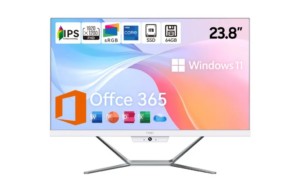
Our NPC-PF2405-D uses a 23.8-inch display with a 1920 × 1080 resolution and a refresh rate of up to 100Hz, depending on the selected configuration. Its specified brightness is 230±20 cd/m². This combination is suited to everyday office work, browsing, productivity software, and general multimedia use.
For business buyers, Full HD resolution can provide a sensible balance between image clarity and system requirements. A 23.8-inch form factor can also fit naturally into individual workstations where desk space needs to remain manageable.
The Processor and Motherboard Drive the System
The computing core is typically built around a compact motherboard designed specifically for the all-in-one enclosure. Processor selection affects performance, power requirements, cooling design, and the types of applications the system can support.
The NPC-PF2405-D incorporates an AMD Ryzen™ 5 7430U processor. AMD lists this processor with six CPU cores, 12 threads, a maximum boost clock of up to 4.3GHz, and a default TDP of 15W. It also supports DDR4 memory and Windows 11.
The processor’s 15W default TDP is particularly relevant to compact system design because thermal and power considerations are closely connected. AMD also notes that actual boost behavior can depend on factors including system cooling, motherboard design, BIOS, drivers, and operating-system updates.
Memory and Storage Need Efficient Integration
After the processor, memory and storage are central to everyday system responsiveness. Their physical formats matter in an all-in-one design because internal space is more constrained than in many traditional desktop towers.
The NPC-PF2405-D is configured with 16GB of SO-DIMM DDR4 memory at 3200MHz and a 512GB M.2 2280 SSD. This combination provides a practical configuration for business productivity, document handling, web applications, communication software, and everyday multitasking.
For all-in-one PC manufacturers, choosing compact component standards can help create an efficient internal layout. It also requires attention to compatibility between the motherboard, processor, memory, storage interface, firmware, and power system.
Cameras and Connectivity Expand Use Cases
Modern desktop computers increasingly support communication and connected workflows. An integrated camera can eliminate the need for an external webcam, while wireless connectivity can reduce the number of physical cables required around a workstation.
The NPC-PF2405-D includes a 5.0MP camera and Bluetooth 5.1. Its Wi-Fi module uses an M.2 interface supporting PCIe + USB and CNVi, with Wi-Fi specified as optional. These features allow the configuration to address different connectivity requirements without changing the basic all-in-one concept.
From a procurement perspective, connectivity should be evaluated according to the target market. Different customers may prioritize wireless networking, Bluetooth peripherals, video conferencing, or straightforward wired configurations.
Power and Operating System Complete the Platform
Power delivery is another consideration that becomes important when multiple components share one enclosure. The NPC-PF2405-D uses a DC 19V/6.32A adapter with a DCφ5.0×2.5mm connector, with matching based on the motherboard power requirements.
The system runs Windows 11, providing a familiar operating environment for business users. AMD officially lists Windows 11 64-bit among the supported operating systems for the Ryzen 5 7430U.
These specifications illustrate why all-in-one PC manufacturers need to coordinate hardware and software rather than treating each component as an isolated purchasing decision.
Why Integrated Design Matters for Business Buyers
For distributors, retailers, office-equipment suppliers, and project buyers, an all-in-one computer can simplify product positioning because the display and computing platform arrive as one integrated system. Fewer external components can also make workstation installation more straightforward.
At NPC, we approach all-in-one computer development by combining display technology, computing hardware, storage, connectivity, and operating-system compatibility into a unified product platform. Our NPC-PF2405-D demonstrates this approach with a 23.8-inch Full HD display, AMD Ryzen™ 5 7430U processor, 16GB memory, 512GB SSD, 5.0MP camera, Bluetooth 5.1, optional Wi-Fi, and Windows 11.
Building Compact Computing Solutions with NPC
For all-in-one PC manufacturers, successful product development depends on balancing performance, physical dimensions, thermal considerations, connectivity, and user requirements. At NPC, we are a technology manufacturing enterprise specializing in smart TVs, monitors, and computing products, including integrated desktop solutions.
We welcome distributors, retailers, office-equipment suppliers, and other business partners to discuss the NPC-PF2405-D and our broader computing portfolio. Contact NPC today to explore suitable all-in-one PC solutions for your target market and application requirements.