







A 49-inch super ultrawide monitor and two 27-inch displays deliver nearly identical total screen width. The question is not which setup gives you more space — it is which setup matches how you actually work.
This article maps out the concrete trade-offs between a 49 inch ultrawide vs dual monitor setups: where each format wins, what specifications determine real-world performance, and whether a single NPC gaming monitor can do the same job — but better.
What a 49-Inch Super Ultrawide Actually Gives You
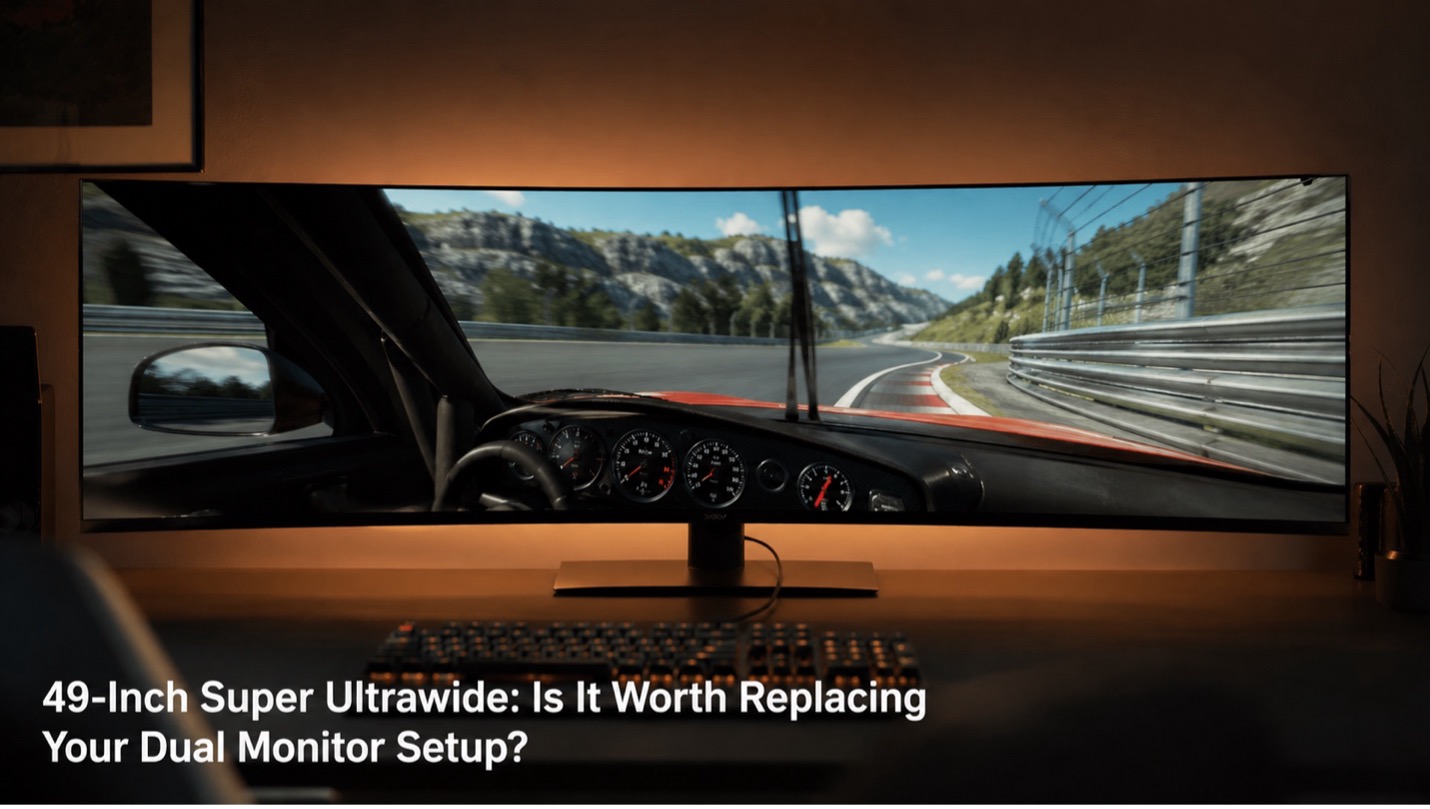
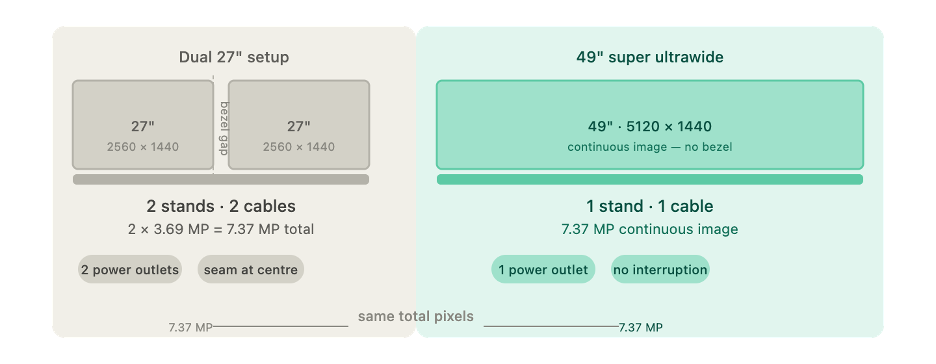
A 49-inch panel at 5120×1440 — also called Dual Quad HD (DQHD) — renders 7.37 million pixels across a 32:9 aspect ratio.1 That is the same horizontal real estate as two 27-inch 1440p panels placed side by side, without a bezel gap between them.
Practically, this means one cable run to the GPU, one power outlet, and one on-screen display (OSD) to manage. There is no physical seam interrupting the image at the center of your field of view.
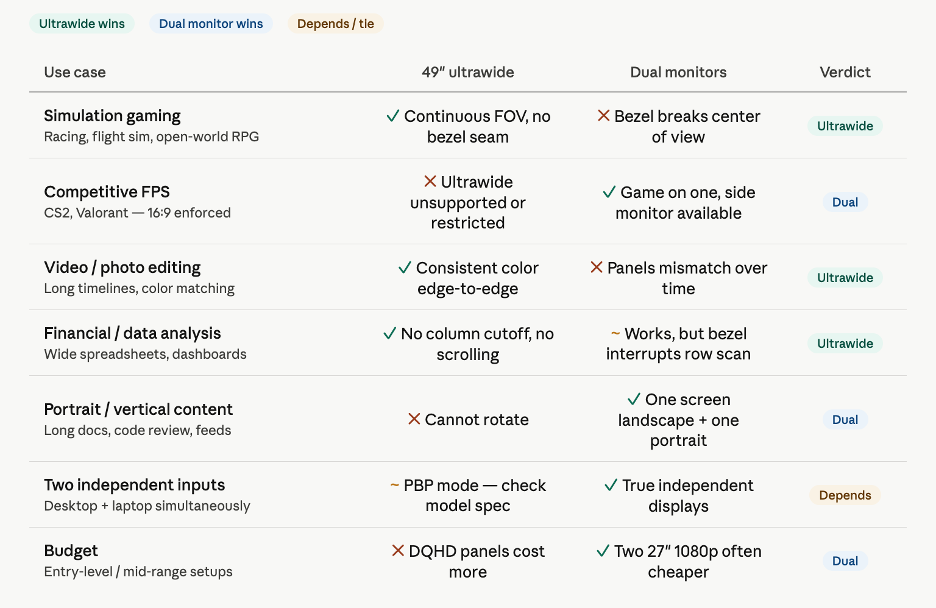
Most 49-inch panels include Picture-by-Picture (PBP) mode. PBP splits the screen into two independent video inputs — for example, a desktop on the left half and a laptop on the right — without requiring a second physical display. PBP behavior varies by model: some implementations cap one input to a lower refresh rate or add a small input latency penalty, so verify the specification sheet before relying on it for latency-sensitive tasks.
Where a 49-Inch Ultrawide Outperforms Two Monitors
For certain workflows, a single 49-inch panel produces results that a dual-monitor setup cannot match:
Simulation gaming
Racing simulators, flight simulators, and open-world role-playing games are built to exploit a wide field of view. At 32:9, the game image wraps around the viewer's peripheral vision continuously, with no bezel breaking the image at the critical center point. In titles such as Assetto Corsa and iRacing, the full corner entry and apex are visible simultaneously without camera movement.
Color-accurate work
Two monitors — even from the same manufacturer — develop different color temperature and brightness over time as backlights age independently. A single 49-inch panel delivers consistent color reproduction edge to edge, which matters for photographers, video editors, and designers comparing versions across the full width.
Uninterrupted timelines and data grids
Video editing timelines, large spreadsheets, and financial dashboards stretch without interruption across 49 inches. Applications that support ultrawide aspect ratios display proportionally more content without scrolling or window-switching.
Single-cable desk setup
One stand, one power cable, and one DisplayPort or HDMI cable replace the two of each required by a dual-monitor configuration.
Where Dual Monitors Still Win
Two monitors are not a worse version of one super ultrawide. They are a different tool with different strengths:
Portrait mode
A dual setup allows one landscape display alongside one portrait-rotated display — practical for reading long documents, reviewing code, or monitoring live feeds. A 49-inch panel cannot rotate.
Hardware failure resilience
If one monitor fails, the other remains functional. A single 49-inch panel is a single point of failure for the entire visual workspace.
Fullscreen gaming plus a side monitor
Running a game fullscreen on one 27-inch display while keeping Discord or a stream on the second monitor is a configuration many competitive players use. Some 49-inch panels support PBP for this scenario, but verify whether the implementation preserves the refresh rate and input latency on both halves before committing.
Budget
Two capable 27-inch 1080p displays can cost substantially less than one 49-inch DQHD panel. If the workflow does not require a continuous image, the cost difference is difficult to justify.
Key Specs to Evaluate Before Switching
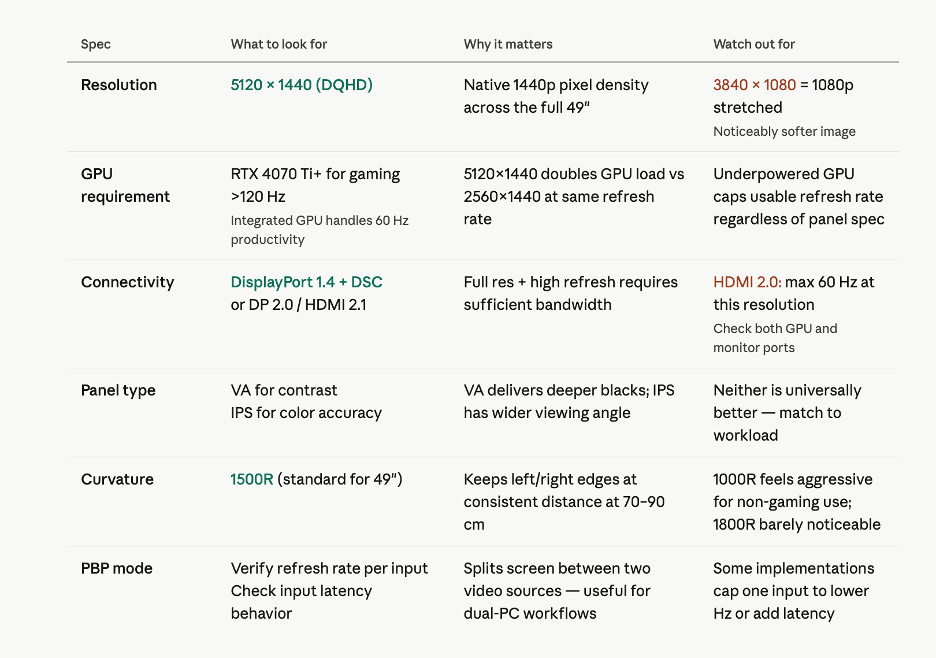
Four specifications determine whether a 49-inch super ultrawide performs as expected:
Resolution
The DQHD standard is 5120×1440. Some panels marketed as 49-inch super ultrawides run at 3840×1080 — 1080p pixel density stretched to fill a wider frame, producing a noticeably softer image. Confirm the native resolution before purchasing.
GPU requirements
Moving from a standard 2560×1440 display to 5120×1440 at the same refresh rate roughly doubles the GPU's pixel rendering workload.1 For productivity tasks at 60Hz, a modern integrated GPU handles the output. For gaming above 120Hz at DQHD, an NVIDIA RTX 4070 Ti or AMD equivalent is a practical minimum; the RTX 4080 handles 240Hz in most titles without frame rate compromises. For a full breakdown of which refresh rate suits your use case, see our guide on 144Hz vs 240Hz monitors.
Connectivity
Delivering 5120×1440 at 240Hz requires DisplayPort 1.4 with Display Stream Compression (DSC) active, or DisplayPort 2.0. HDMI 2.1 supports this resolution at up to 120Hz. HDMI 2.0 cannot carry 5120×1440 above 60Hz. Verify port compatibility between the GPU and monitor before purchase.
Curvature
1500R is the standard curvature for 49-inch panels. At a desk distance of 70–90 cm, 1500R keeps the left and right edges of the screen at a roughly consistent viewing distance. At distances above 100 cm, the wrap effect is less noticeable.
Who Should Make the Switch — and Who Should Not
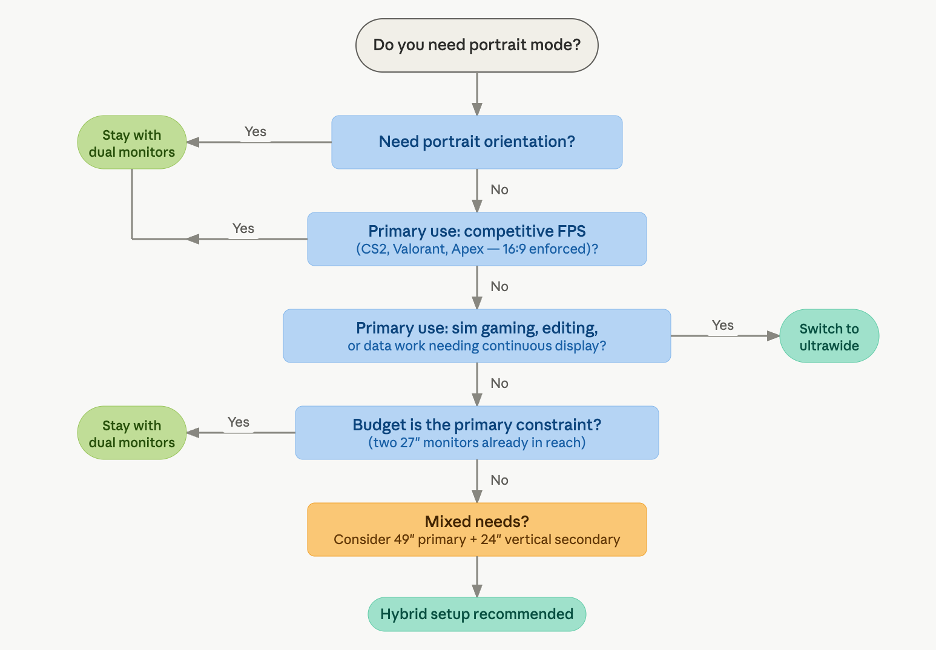
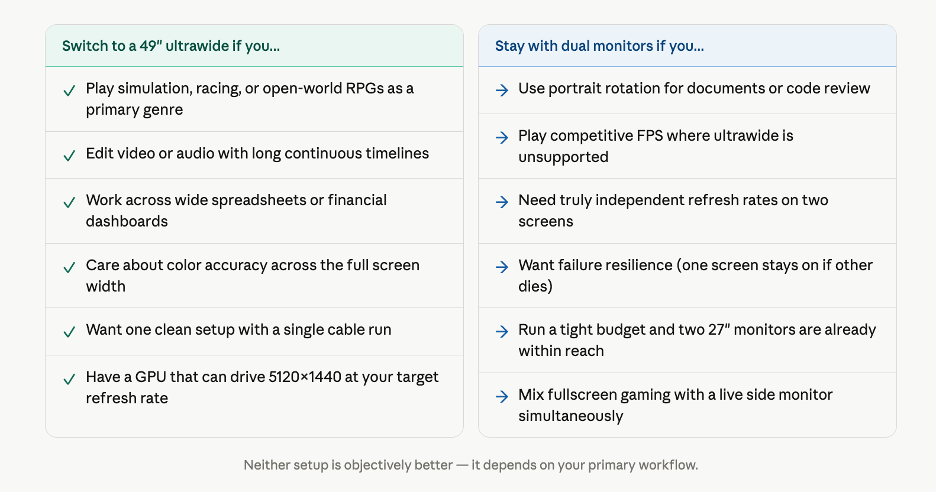
Switch to a 49-inch super ultrawide if: your primary use is simulation gaming, photo or video editing, financial data analysis, or any workflow requiring one continuous horizontal workspace.
Stay with dual monitors if: you rely on portrait mode, play competitive first-person shooters where ultrawide is unsupported or offers no field-of-view advantage, or need fully independent video inputs at different refresh rates.
Consider a hybrid setup: a 49-inch panel as the primary display paired with a secondary 24-inch vertical monitor for messaging, monitoring, or documentation combines the advantages of both approaches without compromise.
The NPC MC4937-R — Specifications in Context
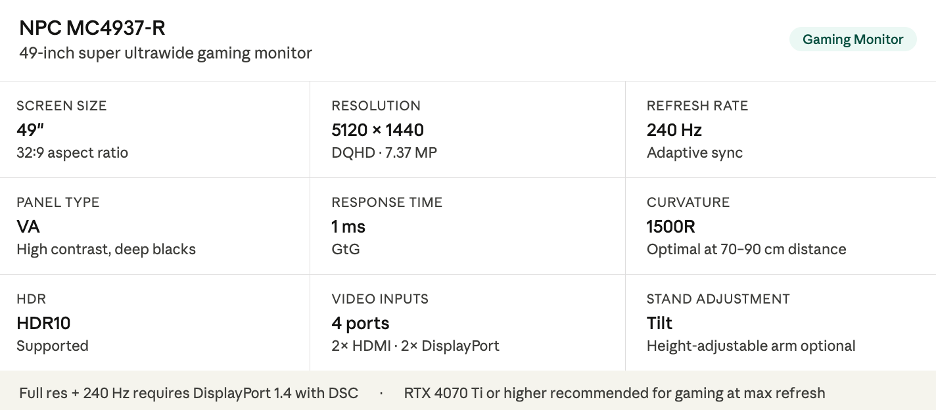
The NPC MC4937-R is a 49-inch DQHD (5120×1440) gaming monitor with a VA panel, 240Hz refresh rate, 1500R curvature, 1ms response time, HDR10 support, adaptive sync, and four video inputs (two HDMI, two DisplayPort).
For simulation gamers: the 240Hz ceiling paired with the 32:9 continuous field of view addresses the two primary reasons to choose this format. VA panel contrast performance delivers deeper blacks than comparable IPS panels at the same price tier, which benefits dark-scene rendering in open-world games.
For content creators: consistent color reproduction across the full panel width removes the color-matching problem inherent to dual-monitor setups.
For productivity users: PBP mode allows a desktop and a laptop to occupy separate halves of the screen simultaneously. Verify refresh rate behavior per input when using PBP, as this varies by firmware version.
Conclusion
A 49-inch super ultrawide does not replace two monitors in every scenario. It replaces them specifically in scenarios where a continuous, bezel-free image matters more than orientation flexibility — and where the GPU investment to drive 5120×1440 at high refresh rates is already justified by the workload.
For simulation gamers, video editors, and analysts who operate primarily within a single continuous workspace, the switch is well-supported. For everyone else, two monitors remain the more adaptable and often lower-cost choice.
References
[1] Aspect Ratio Calculator. "Gaming & Ultrawide Monitor Aspect Ratios Guide." Aspect Ratio Calculator, 2025, aspectratiocalculator.com/gaming-aspect-ratios/. Accessed 27 Apr. 2026.


