

Display selection has become more complex as monitors serve multiple roles. Office users prioritize readability, creators need dependable color reproduction, gamers value smooth motion, and businesses may need flexible displays for shared spaces. A practical monitor guide should begin with the workload, then connect it to size, resolution, panel technology, refresh rate, color, and smart functionality.
Start With the Primary Use Case
The first step is defining what the display needs to do most often. Productivity users may benefit from a larger workspace and clear text, while creative professionals generally place greater emphasis on resolution and color. Gaming users typically pay closer attention to refresh rate and response time.
A monitor used for spreadsheets may need a different configuration from one supporting video editing or interactive entertainment. For computer monitor suppliers, understanding these distinctions helps match specifications with customer requirements.
Match Resolution and Screen Size
Resolution determines how many pixels a monitor uses to form an image. Higher resolutions can provide greater detail and desktop space, but the appropriate choice also depends on screen size and viewing distance. Buyers should balance clarity with the physical space available.
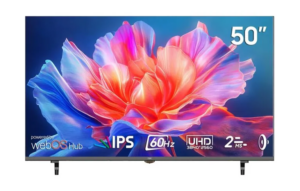
A 4K UHD display uses 3840 × 2160 pixels, making it useful for detailed visual content and large-format applications. Our NPC-MU5021-Y uses a 50-inch panel with a maximum resolution of 3840 × 2160 and a 16:9 aspect ratio. This creates a large canvas for work and entertainment.
Consider Panel Technology and Viewing Characteristics
Panel technology influences viewing behavior, image characteristics, and product positioning. IPS-based displays are widely used where broad viewing angles and consistent image presentation are important. However, buyers should evaluate the complete specification rather than choosing a panel type alone.
The NPC-MU5021-Y uses a TFT-LCD panel supplied by BOE, with ADS panel technology. It provides 178° horizontal and 178° vertical viewing angles. This is useful when a large display needs to remain visible to multiple people.
Refresh Rate Should Match the Workload
Refresh rate describes how many times a display can update the image each second. Dell notes that 60Hz is suitable for activities such as spreadsheets and streaming, while higher refresh rates are commonly associated with gaming and motion-intensive applications.
A 60Hz monitor can suit office productivity, streaming, and general computing. The NPC-MU5021-Y reaches 60Hz, making its configuration more oriented toward large-format productivity, content consumption, and general-purpose use than high-refresh competitive gaming.
Evaluate Color for Creative and Media Work
Color specifications become more important for photography, video, design, and premium media. DCI-P3 is a wide-gamut color space associated with digital cinema and modern HDR content, while coverage indicates how much of that color space a display can reproduce.
Our NPC-MU5021-Y offers 95% DCI-P3 color gamut coverage according to our official product specification. It also supports 1.07 billion colors with 10-bit color depth. For computer monitor suppliers serving creative or media-oriented customers, these details support product matching beyond screen size.
Smart Features Expand Monitor Applications
A monitor can now function as more than a passive display. Smart platforms can provide access to streaming, cloud gaming, and other applications without requiring a separate computer for every activity. LG explains that webOS-based screens can provide access to cloud gaming platforms and entertainment services through an integrated interface.
Our NPC-MU5021-Y is equipped with LG webOS and includes the “Play all cloud games” function through webOS Hub. It supports access to Netflix, Amazon Prime Video, Disney+, Max, Paramount+, Spotify, Rakuten TV, and YouTube. This makes the model relevant to customers seeking an all-in-one display for computing, entertainment, and cloud-based use.
Look Beyond Individual Specifications
For procurement teams, line-by-line comparison is useful, but the final decision should consider how specifications work together. Screen size, resolution, panel technology, viewing angle, refresh rate, color coverage, and smart functions collectively define the product experience.
Computer monitor suppliers should also understand the customer’s deployment environment. Corporate offices, education facilities, hospitality spaces, gaming areas, and creative studios may require different priorities. Asking about workload, viewing distance, content type, and connectivity needs can make selection more precise.
Build a Product Mix Around Real Applications
For businesses purchasing at scale, one display configuration may not serve every customer segment. A portfolio can include conventional office monitors, high-refresh gaming models, professional displays, and smart monitors. This lets distributors address distinct use cases without forcing one specification set into every environment.
At NPC, we specialize in smart TVs, monitors, and computing products, giving business customers access to display solutions for varied applications. Our NPC-MU5021-Y combines a 50-inch TFT-LCD display, BOE panel, ADS technology, 3840 × 2160 resolution, 60Hz refresh rate, 350 cd/m² brightness, and LG webOS in one smart monitor platform.
Make the Display Choice Fit the Job
The right monitor is the one whose specifications correspond to the work, content, environment, and users it serves. Resolution supports detail, panel technology shapes viewing characteristics, refresh rate affects motion, and color coverage matters for visual work. Smart functionality can further broaden the display’s role.
At NPC, we combine display manufacturing capabilities with configurations designed for modern business and consumer applications. For computer monitor suppliers and other business buyers seeking large-format smart displays, the NPC-MU5021-Y provides a 50-inch UHD platform with LG webOS and broad entertainment functionality. Contact us to discuss suitable monitor configurations for your market and application.