

Modern families rely on computers for a wide range of activities, from online learning and remote work to entertainment, communication, and household management. Unlike traditional desktop setups that require separate monitors, towers, and multiple cables, all-in-one computers combine essential components into a single streamlined device. For households looking to maximize space while maintaining reliable performance, understanding the features that define the best all-in-one home computer can help make a more informed purchasing decision.
When selecting a family computer, users should look beyond appearance and consider practical factors such as processing power, display quality, storage capacity, connectivity, and ease of use. These elements determine whether a device can support different family members’ needs over the long term. At NPC, we focus on developing computer solutions that balance performance, usability, and efficient design for modern digital environments.
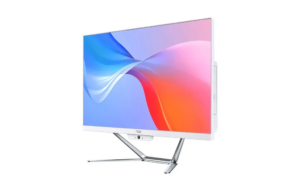
Display Quality and Screen Size Improve Everyday Family Experiences
The display is one of the most important features when choosing a home computer because family members may spend hours viewing online courses, documents, videos, and digital content. A suitable screen should provide clear images, comfortable viewing, and enough workspace for multitasking.
For many households, a 23.8-inch display offers a practical balance between visibility and space efficiency. The NPC-PF2405-D features a 23.8-inch screen with a 1920×1080 resolution and a 100Hz refresh rate, providing smooth image transitions for everyday activities such as web browsing, video streaming, and office applications.
Brightness is another factor that affects usability, especially in different home environments. The NPC-PF2405-D is designed with a brightness specification of 230±20Lux, helping users maintain clear screen visibility during regular indoor use. These display characteristics make it suitable for families that need a shared computer for multiple scenarios.
Performance Requirements for a Best All-in-One Home Computer
A family computer needs enough computing power to handle various tasks without unnecessary delays. While basic activities such as browsing and document editing require moderate performance, modern households often need additional capability for video meetings, educational software, creative applications, and multitasking.
The best all-in-one home computer should provide a processor that can support changing daily requirements. At NPC, we equip the NPC-PF2405-D with an AMD Ryzen™ 5 7430U processor to deliver responsive performance for common home and productivity applications. This processor helps families manage multiple tasks, including online learning platforms, office software, entertainment applications, and communication tools.
Memory capacity also plays an important role in maintaining smooth operation. With SO-DIMM DDR4 16GB 3200MHz memory, the NPC-PF2405-D provides sufficient resources for everyday multitasking. Whether family members switch between browser tabs, productivity tools, or video conferencing applications, adequate memory helps improve overall system responsiveness.
Storage and Connectivity Support Flexible Home Computing
Storage is another essential consideration because family computers often store documents, photos, videos, applications, and educational materials. A device with fast and reliable storage can improve startup speed and provide a smoother user experience.
The NPC-PF2405-D uses an M.2 2280 SSD with 512GB storage capacity. Compared with traditional hard drives, SSD technology generally provides faster data access and helps reduce waiting time when opening applications or managing files. This makes daily computing more efficient for families with diverse digital storage needs.
Connectivity features are also important because modern homes often include multiple wireless devices. The NPC-PF2405-D supports Bluetooth 5.1, allowing convenient connection with compatible peripherals and accessories. It also provides an optional M.2 module for WiFi connectivity, supporting PCIe+USB and CNVi configurations based on system requirements.
When evaluating the best all-in-one home computer, users should consider not only current needs but also how easily the device can integrate into a connected household. Reliable wireless functions allow families to create a more flexible and organized workspace.
Built-In Camera and User-Friendly Design Enhance Communication
Video communication has become a regular part of home computing, especially for remote education, online meetings, and family connections. A built-in camera eliminates the need for additional accessories and creates a cleaner desktop setup.
The NPC-PF2405-D includes a 5.0 MP camera, providing a convenient solution for video calls and online interaction. This feature supports families that need a computer for both personal communication and professional activities.
Beyond hardware specifications, an all-in-one computer should also simplify daily use. A compact integrated design reduces cable clutter and saves desk space, making it easier for families to place the computer in bedrooms, study areas, or shared living spaces. A simple setup process allows different users, including students and older family members, to operate the device more comfortably.
Selecting a Reliable Family Computer for Long-Term Use
Choosing the best all-in-one home computer requires a comprehensive evaluation of performance, display, storage, connectivity, and practical design. Families should identify the features that match their daily activities instead of focusing only on individual specifications.
At NPC, we design and manufacture computer solutions that address the needs of modern users, including home, commercial, and professional environments. Our NPC-PF2405-D integrates a 23.8-inch Full HD display, AMD Ryzen™ 5 7430U processor, 16GB DDR4 memory, 512GB SSD storage, 5.0 MP camera, Bluetooth 5.1, Windows 11 system, and flexible connectivity options to support efficient everyday computing.
For businesses seeking dependable all-in-one computer solutions for different application scenarios, we welcome you to contact NPC to discuss customized requirements and explore suitable computing solutions.