

Choosing a computer for home use is no longer simply a matter of selecting the most powerful desktop available. Space, setup simplicity, display quality, connectivity, and everyday workload all influence the decision. An all-in-one home computer combines the display and core computing hardware in one chassis, creating a streamlined alternative to a conventional desktop with a separate tower and monitor. For households, home offices, and business users working from home, this difference can have practical value.
What Makes an All-in-One Computer Different?
A traditional desktop normally separates the computer tower from the monitor. This arrangement provides flexibility because users can replace or upgrade individual components and select displays according to their requirements. However, it also requires more desk space and additional cables.
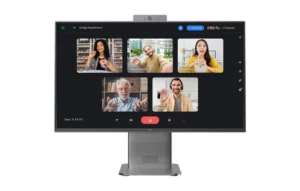
An all-in-one system integrates major computing components behind or around the display. Microsoft describes the all-in-one form factor as an evolution of the traditional desktop that combines system components and the display into one chassis. This approach reduces the physical footprint while retaining the familiar desktop-style experience.
For home environments, this configuration can make workstation planning easier. A single integrated unit can leave more room for documents, peripherals, or other equipment. It can also simplify deployment when multiple systems need to be installed in similar work areas.
Where Does an All-in-One Home Computer Have an Advantage?
Space efficiency is one of the clearest advantages. A separate desktop tower, monitor, and associated cables can occupy a considerable portion of a workstation. An all-in-one home computer consolidates these major elements, making it suitable for compact desks, study areas, reception spaces, and home offices.
Setup can also be more straightforward. Instead of coordinating a monitor and separate computer chassis, users work with one primary computing unit. This can be useful for organizations supplying computers to employees who work from home, especially when consistent installation and simple workspace management matter.
The integrated format can also support a cleaner working environment. Microsoft notes that choosing a Windows 11 device should depend on factors such as where it will be used, the workload, screen requirements, and expected longevity. These considerations are particularly relevant when comparing a fixed desktop setup with a more consolidated form factor.
Performance Still Matters More Than Form Factor
Compact design should not mean overlooking hardware. For office productivity, remote work, education, communication, and general home computing, the processor, memory, storage, and display should match the intended workload.
The NPC-PF2412-B, for example, uses an Intel® Core™ i5-13420H Processor. Intel specifies this processor with 8 cores, 12 threads, a maximum turbo frequency of 4.60 GHz, and 12 MB Intel® Smart Cache. It supports DDR4-3200 memory as well as other memory standards depending on configuration.
Our configuration pairs that processor with 16GB of SO-DIMM DDR4 3200MHz memory and a 512GB M.2 2280 SSD. This combination provides a practical hardware foundation for common productivity workloads, including office applications, web-based work, document handling, communication, and multitasking.
Display and Connectivity Are Part of the Business Decision
A computer used for extended periods should also provide an appropriate viewing experience. The NPC-PF2412-B features a 23.8-inch display with a resolution of 1920 × 1080. Available refresh-rate options include 60Hz and 100Hz, depending on the selected configuration. Its specified brightness is 230±20 cd/m².
Connectivity is another consideration for business-oriented deployments. The NPC-PF2412-B supports Bluetooth 5.2 and has an M.2 interface for Wi-Fi using PCIe + USB and CNVi, with Wi-Fi listed as optional in the supplied configuration. The system also includes a 3.0 MP camera, supporting use cases where video communication is part of the daily workflow.
When Is a Traditional Desktop Still Preferable?
An all-in-one system does not eliminate the reasons businesses and advanced users choose traditional desktops. Conventional desktops generally provide greater flexibility for component replacement, expansion, and customized configurations. Users with demanding graphics workloads, specialized hardware requirements, or extensive upgrade plans may therefore prefer a separate tower.
A traditional desktop can also make sense when organizations need multiple displays or highly specific peripherals. Microsoft notes that desktops offer advantages for users who prioritize comfort, performance, large displays, and multi-monitor configurations.
The choice therefore depends less on which form factor is universally better and more on the intended application. A fixed workstation with straightforward computing requirements may benefit from integration, while specialized workloads may place greater value on expandability.
Making the Choice Based on the Work Environment
For businesses, selecting computers should involve more than comparing processor names. Buyers should consider available desk space, expected workloads, display requirements, connectivity, maintenance practices, and how consistently systems need to be deployed.
An all-in-one home computer can be particularly relevant when simplicity and efficient use of workspace are priorities. It brings the display and computing hardware together while maintaining a desktop operating environment. Windows 11 also provides features such as multiple desktops, allowing users to organize different applications and tasks into separate workspaces.
At NPC, we design computer solutions with practical business and home-office requirements in mind. Our NPC-PF2412-B combines a 23.8-inch 1920 × 1080 100Hz display with an Intel® Core™ i5-13420H Processor, 16GB DDR4 memory, 512GB M.2 2280 SSD storage, 3.0 MP camera, Bluetooth 5.2, optional Wi-Fi, and Windows 11. For organizations evaluating an all-in-one home computer, we invite you to contact NPC for more information about suitable configurations and business computing solutions.