

Selecting a display has become more complicated as monitors now serve a wider range of purposes. A screen used for office productivity may prioritize clarity and comfort, while a gaming display requires smooth motion and fast response. For businesses, distributors, and technology buyers, understanding how specifications match different scenarios is essential when evaluating the best PC monitors for various user requirements.
Identify the Main Purpose Before Choosing a Monitor
The first step in selecting a monitor is understanding how it will be used. Professional users may need a display that supports multitasking, document processing, design work, or data analysis. Gamers often focus on refresh rate, response time, and adaptive synchronization. Everyday users usually look for a balanced combination of image quality, convenience, and value.
For businesses building product portfolios, the concept of the best PC monitors depends on the target audience. A single configuration may not satisfy every application, so selecting models based on specific user needs can improve customer satisfaction and market positioning.
Resolution and Screen Size Define the Viewing Experience
Resolution determines the amount of detail a monitor can display, while screen size influences the available working area. A higher resolution can provide sharper images and more workspace, especially when users manage multiple windows or view detailed content.
For gaming and entertainment applications, a wider aspect ratio can create a more immersive experience. Ultrawide monitors are increasingly popular because they provide expanded horizontal space without requiring multiple displays.
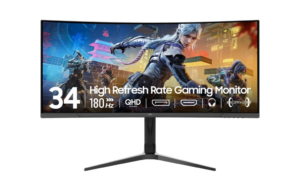
Our NPC-MP3429-Y features a 34-inch curved display with a 3440×1440 resolution and a 21:9 aspect ratio. This ultrawide format provides additional screen space for gaming environments, creative workflows, and multitasking scenarios.
Panel Technology Affects Image Quality
The panel type is another important factor when comparing monitors. Different panel technologies influence characteristics such as contrast, viewing angles, color performance, and response behavior. VA panels are often recognized for strong contrast performance, making them suitable for entertainment and gaming applications where deeper blacks and immersive visuals are valued.
The NPC-MP3429-Y uses a VA display with a 1500R curvature. The curved design helps create a more surrounding viewing experience, particularly on a large ultrawide screen. For users who spend extended periods working with visual content or playing games, the curved format can provide a more engaging perspective.
Refresh Rate and Response Time Support Smooth Performance
Refresh rate indicates how frequently a monitor updates the displayed image, while response time describes how quickly pixels can change between colors. These specifications are especially important for gaming, fast-moving video, and interactive applications.
Higher refresh rates can make motion appear smoother by increasing the number of image updates per second. A lower response time can help reduce visible motion blur during fast scenes.
Our NPC-MP3429-Y supports a 165Hz refresh rate and a 1ms response time. This combination is designed for users who require responsive performance, making the model suitable for gaming environments and other applications where smooth motion is important.
HDR and Adaptive Sync Improve Visual Performance
Modern monitors increasingly include technologies that improve image quality and synchronization. HDR10 support allows compatible content to display a wider range of brightness levels and contrast, while adaptive sync technologies help reduce screen tearing by coordinating the monitor refresh rate with the graphics output.
The NPC-MP3429-Y supports HDR10 and Adaptive Sync. These features enhance its ability to handle dynamic gaming scenes and multimedia content. For customers comparing the best PC monitors, additional display technologies can help determine whether a monitor fits specific entertainment or professional requirements.
Connectivity and Ergonomic Features Matter for Long-Term Use
A monitor should also provide practical features that support everyday operation. Connectivity options determine compatibility with computers, gaming devices, and other equipment, while adjustment features influence comfort during extended use.
The NPC-MP3429-Y includes DisplayPort and HDMI interfaces, allowing users to connect different types of devices. It also features tilt adjustment, helping users position the screen according to their preferred viewing angle.
For businesses purchasing displays in larger quantities, these practical details are important because they influence installation flexibility and user experience across different environments.
How Businesses Can Evaluate Monitor Solutions
When companies and distributors evaluate monitor products, specifications should be considered together rather than individually. A high refresh rate may be valuable for gaming users, but office customers may prioritize resolution, screen size, and ergonomic features instead.
For PC monitor manufacturers, understanding market segments is essential when developing products. Professional users, gaming communities, educational institutions, and commercial customers often have different expectations. Product selection should therefore begin with application requirements instead of focusing only on individual technical numbers.
Creating Display Solutions for Different Markets
At NPC, we specialize in smart TVs, monitors, and computing products, providing display solutions designed for different applications. We understand that customers looking for the best PC monitors need products that combine suitable specifications with reliable performance.
Our NPC-MP3429-Y represents a curved gaming monitor solution with a 34-inch VA display, 3440×1440 resolution, 165Hz refresh rate, 1ms response time, 1500R curvature, HDR10 support, Adaptive Sync technology, DisplayPort, HDMI, and tilt adjustment. This configuration helps address the needs of users seeking immersive entertainment and responsive display performance.
Selecting the Right Monitor for Every Scenario
The ideal monitor choice depends on the relationship between specifications and usage requirements. Work environments may require clarity and productivity features, gaming applications may demand speed and synchronization, and everyday users often need a balanced solution.
At NPC, we continue developing display products that support diverse business and consumer applications. Through our monitor solutions, we help partners provide suitable options for different market segments, from professional workstations to gaming setups. Contact NPC today to explore monitor solutions designed for your customers’ specific needs and applications.