

Household workstations must balance competing tasks within limited living areas. Parents manage home administration, children attend remote lessons, and family members watch digital entertainment on the same desk. Traditional tower configurations often overwhelm domestic furniture with excessive cables, power bricks, and bulky chassis components.
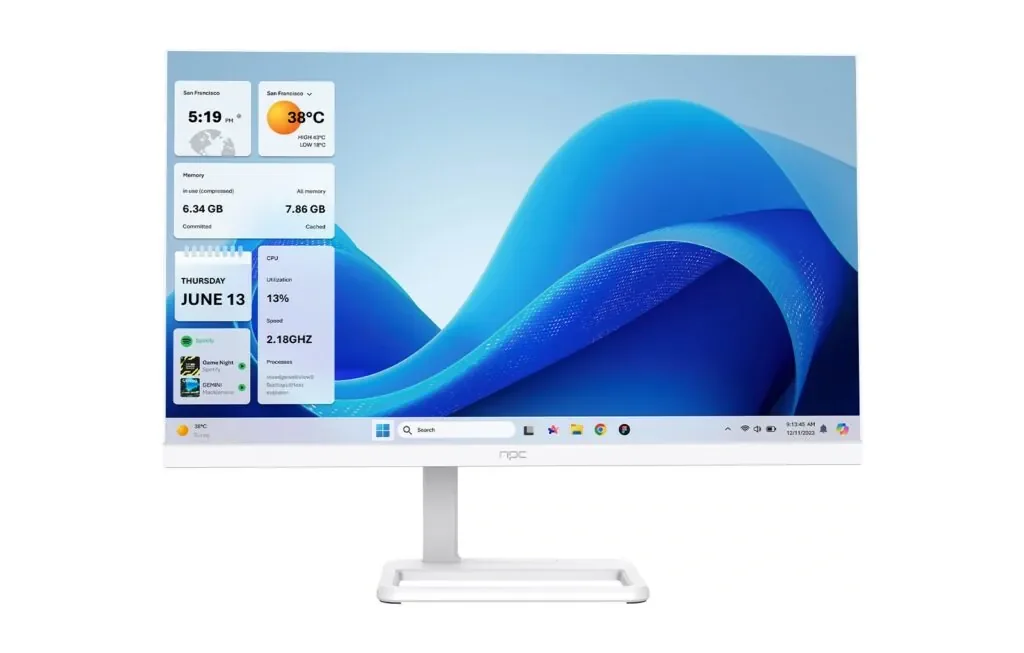
Evaluating whether an all-in-one home computer fulfills family computing expectations requires examining how consolidated hardware functions in shared domestic environments.
Integrating internal computing modules directly behind the display panel presents an alternative to separate towers and compact laptops. Modern households benefit from understanding how this setup supports diverse routines without clutter.
Workstation Organization and Physical Footprint
Shared family desks in living rooms, study corners, or bedrooms quickly turn chaotic when housing multiple disconnected hardware pieces. Standard desktop towers take up substantial floor area or occupy valuable desk surfaces where homework books belong. Consolidating the host hardware into the display structure reduces physical footprint across active rooms and simplifies room cleaning routines.
Cable management represents another practical consideration for residential settings. Separate computer components require individual power wires, video display cords, speaker links, and external camera connections that gather dust behind furniture. Operating an integrated system requires connecting a single power lead, leaving tabletops clean, safe, and accessible for physical writing materials and textbooks.
Screen Sizing Options and Viewing Comfort
Visual display dimensions influence how comfortably multiple household members interact with the screen. Compact 21.5-inch panels suit narrow student desks or tight study spaces where surface area remains constrained. Standard 23.8-inch screens provide a balanced display area, giving students and home professionals comfortable visual space for daily text documents and spreadsheets.
Expansive 27-inch configurations offer broader viewing space that benefits split-window research and collective family viewing. Display resolutions such as 1920 by 1080 Full HD keep typography sharp and web navigation legible across normal desk distances. Wide viewing angles allow parents to check student homework from the side without chromatic distortion, while micro-edge bezels maximize screen immersion.
Ergonomic Adjustability Across Different Age Groups
Accommodating users of different physical heights presents an essential requirement for shared family computers. Elementary students sit noticeably lower relative to desk surfaces, whereas adult home workers require higher sightlines to prevent neck stiffness. Fixed desktop displays frequently force users into awkward seated positions that lead to physical fatigue over extended work periods.
Ergonomic stands with height-adjustable and tilt-flexible mechanisms help resolve these viewing conflicts. Family members can raise, lower, or angle the display panel to match natural seated eye levels without stacking books beneath the base. Tilting the screen also mitigates reflections from domestic overhead lighting or nearby windows, supporting comfortable posture throughout lengthy study sessions.
Household Processing Balance and Everyday Software
Daily family computing involves shifting between multiple active applications throughout the morning and evening. Students open browser research tabs, parents review financial spreadsheets, and children play casual media applications consecutively. Hardware must execute these common tasks smoothly without generating distracting fan noise or excessive heat inside shared domestic spaces.
Deploying an all-in-one home computer with responsive multi-core processing and solid-state storage allows family members to transition between concurrent tasks without annoying lag. Fast drive storage shortens startup times, allowing children to launch learning software promptly. Preinstalled operating systems such as Windows provide an intuitive interface familiar to both students and adults, while balanced internal cooling maintains stable performance.
Audio-Visual Tools and Essential Connectivity
Remote school sessions and virtual family conversations require integrated audio and camera equipment. Built-in webcams positioned at the top of the display remove the requirement to purchase, mount, and configure third-party camera units. Integrated stereo speakers deliver clear vocal reproduction, allowing children to hear online instructors distinctly without wearing headphones all day.
Connecting household accessories demands flexible input and output interfaces positioned along the computer chassis. Multiple USB ports accommodate keyboard receivers, mice, flash drives, and family document printers at the same time. Video output options like HDMI allow households to connect an extra monitor or link the computer to a larger screen for group study. Dedicated audio jacks allow private headphone listening during focused work.
Network stability remains essential when children take online tests or family members stream high-definition media. Built-in wireless connectivity and Bluetooth link cordless peripherals without adding clutter to the workstation. An integrated RJ45 Ethernet port provides a dependable wired alternative, safeguarding critical school connections against wireless signal drops during peak household internet hours.
Everyday Suitability and Brand Manufacturing Support
Reviewing overall family suitability confirms that integrated desktop designs satisfy everyday household computing demands effectively. Combining the display, computing hardware, audio, and camera into a unified device solves space constraints, simplifies daily cleaning, and provides sufficient performance for general productivity. Families gain an organized digital workstation tailored for shared domestic environments.
At NPC, we manufacture dependable all-in-one desktop solutions engineered to balance modern styling, practical connectivity, and reliable processing across global markets. Our production combines quality panels in 21.5-inch, 23.8-inch, and 27-inch configurations with responsive customer service channels to support household computing needs. Every unit undergoes strict factory inspection to verify display clarity, component stability, and everyday operational reliability.
Choosing NPC gives households and distribution partners access to cost-effective computing backed by dedicated warranty protection and direct manufacturer support. Our products deliver dependable performance designed to handle remote work, student education, and family entertainment with confidence.
Factory-backed after-sales coverage helps maintain operational peace of mind throughout the working lifespan of each display computer. Contact our sales team at NPC today to discover customizable hardware configurations, discuss bulk supply partnerships, or request detailed commercial pricing for your home display requirements.