








You have invested in a gorgeous, high-resolution television, perhaps a large QLED screen capable of delivering truly stunning visuals. But when the action ramps up—be it a dramatic film score, an intense gaming session, or a crucial sports commentary—the audio often falls flat. The modern ultra-thin TV design, while aesthetically pleasing, simply doesn't allow for the deep resonance and spatial separation needed for cinematic sound.
Fortunately, upgrading your home audio experience is often simpler and more cost-effective than you might think. Achieving truly immersive sound requires a blend of proper setup, smart software features, and strategic hardware investment. This guide outlines the best steps you can take to move beyond thin, tinny audio and unlock the full potential of your home entertainment system.
The Essential First Steps: Optimizing Your TV’s Environment
Before spending a single dollar on new equipment, you can significantly improve your existing sound quality by making key adjustments to your TV’s settings and placement. This foundational work ensures any future hardware upgrades operate at maximum efficiency.
1. Check TV Placement and Acoustics
Your TV's location profoundly impacts sound quality. If the TV is mounted in a large, open space, sound waves dissipate quickly. If it's placed inside a tight cabinet, sound becomes muffled and distorted.
l Move It Forward: If your TV is recessed in an entertainment center, pull it forward so the speakers (often located on the back or bottom) can project sound freely into the room.
l Reduce Vibrations: If the TV is sitting on a stand, place felt or rubber pads underneath to prevent vibrations from rattling the surface and distorting bass frequencies.
l Review Settings: Dive into your TV’s audio menu. Turn off features designed to level the volume (like "Volume Normalization" or "Dynamic Range Control"). While helpful for late-night viewing, these often compress sound, sacrificing clarity and dynamic range. If your TV offers EQ presets, try "Movie" or "Custom" and slightly reduce mid-range frequencies to make dialogue cleaner.
2. Utilizing Advanced Audio Processing
Modern smart TVs, even without external speakers, can leverage digital signal processing (DSP) to enhance audio. Look for features like Dolby Audio support in your specifications. This allows the TV to decode and optimize soundtracks, ensuring even the built-in speakers deliver the best possible performance before an external system takes over. Recognizing these formats is the first step toward true high-fidelity sound.
Strategic Hardware Upgrades: Soundbars, Systems, and Standards
To achieve genuine theater-quality audio, external speakers are mandatory. The choice between a soundbar and a multi-speaker system depends on your budget, space constraints, and commitment to immersion.
The Soundbar Solution
A soundbar is the quickest and cleanest path to better TV audio. These single-unit systems can simulate spatial audio, making sound seem to come from around and above you, especially models supporting object-based formats like Dolby Atmos or DTS:X.
l Simplicity and Space: A soundbar typically connects via a single HDMI cable and takes up minimal space, making it perfect for smaller living rooms or apartments.
l The Subwoofer Advantage: Many soundbars come with a dedicated wireless subwoofer, providing the deep, rumbling bass frequencies that integrated TV speakers simply cannot reproduce.
The Home Theater Approach (AVR Systems)
For the ultimate fidelity and customization, a dedicated Home Theater System built around an Audio/Video Receiver (AVR) is unbeatable. This setup involves separate speakers (center channel for dialogue, front/rear surrounds, and a powered subwoofer) connected to a central brain (the AVR).
l Total Control: An AVR allows you to individually calibrate the distance, volume, and frequency response of each speaker, perfectly tuning the sound to your room's unique acoustics.
l Future-Proof Connectivity: AVRs typically offer multiple HDMI inputs and high-bandwidth capabilities, ensuring you can pass through the highest quality 4K video signals while simultaneously processing lossless audio formats.
Seamless Sound Integration with webOS hub TV Technology
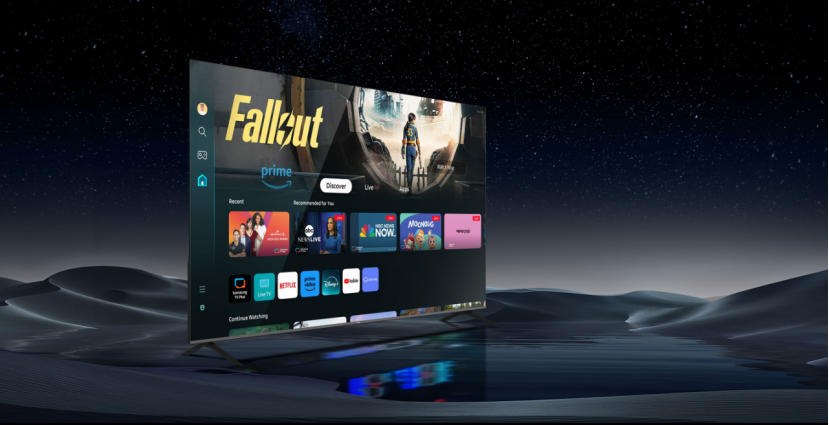
The foundation of a great audio setup is a smart and reliable television platform that acts as an efficient conduit for both video and audio data. This is where advanced operating systems like the webOS hub TV become essential.
The Smart Core of Quality Audio
The NPC webOS TV models, utilizing the LG webOS system, are engineered to function as a seamless central hub for all your media. A high-quality operating system ensures reliable streaming of high-bitrate audio tracks and supports the necessary protocols to communicate with powerful external audio equipment.
Key features that make the webOS hub TV ideal for premium sound integration include:
l Dolby HDR and Dolby Audio Compatibility: The robust platform ensures that when a streaming service or external player sends a signal with advanced audio like Dolby formats, the webOS hub TV can recognize, decode, and correctly pass this information to a soundbar or AVR via HDMI eARC (Enhanced Audio Return Channel). This eARC port is critical, as it allows for the transmission of high-bandwidth, lossless audio formats.
l ThinQ AI Voice Control: Many modern sound systems and smart speakers can be controlled via the TV platform. Using the ThinQ AI voice control integrated into the NPC webOS Hub, users can manage their playback, switch inputs, or adjust volume simply by speaking commands, creating a truly unified entertainment experience.
l Comprehensive Connectivity: With a range of screen sizes from 24 inches up to 100 inches, NPC ensures that every viewer, from a small-space dweller to a dedicated home theater enthusiast, can access a powerful smart platform that supports external Bluetooth speakers, headphones, or hardwired systems.
Connectivity and Maintenance for Lasting Performance
Once your hardware is in place, maintaining a clean connection is key to sustained audio quality.
l Prioritize HDMI eARC/ARC: Always connect your primary audio device (soundbar or AVR) to the HDMI port labeled ARC (Audio Return Channel) or, preferably, eARC. eARC is the newer standard that supports the uncompressed, high-bitrate audio formats like Dolby Atmos that deliver truly stunning 3D sound.
l Regular Software Updates: Keep your TV's operating system (like the webOS hub TV software) and your external audio device firmware updated. Manufacturers frequently release updates that improve sound sync (lip-sync issues) and enhance compatibility with new audio codecs.
By addressing the acoustic environment, selecting the right external hardware, and leveraging the smart, high-performance features of a modern TV platform, you can dramatically transform your viewing experience.
NPC: Your Partner in High-Quality, Integrated Entertainment
For over two decades, NPC has been a leading technology manufacturer specializing in high-definition display products and personal computer solutions for the global market. Established in 2005, NPC’s mission is to provide high-quality, cost-effective, and fully integrated products to both global partners and end consumers.
The NPC webOS Hub smart television series exemplifies this mission, combining the acclaimed, intuitive LG webOS operating system with high-quality QLED and D-LED display technologies. By including features such as ThinQ AI voice control and extensive Dolby HDR and Dolby Audio support across its product range, NPC ensures that every user has the essential foundation for a seamless, immersive, and, most importantly, better-sounding home entertainment system. Choose NPC for a reliable and cost-effective upgrade to your audio-visual future.


