








In the modern digital workspace and entertainment center, the display has evolved far beyond a simple screen. The rise of the smart monitor—an all-in-one display with built-in operating systems, streaming apps, and computing capabilities—has fundamentally changed how we approach desktop setups.
These integrated displays, championed by innovators like NPC, promise a streamlined experience, eliminating clutter and maximizing efficiency. However, a crucial question often arises for users prioritizing media consumption and immersion: How does the built-in audio quality of a smart monitor compare to a dedicated external speaker setup?
This analysis explores the technical trade-offs between integrated convenience and dedicated audio fidelity, providing a professional framework for deciding which setup is right for your professional or entertainment needs.
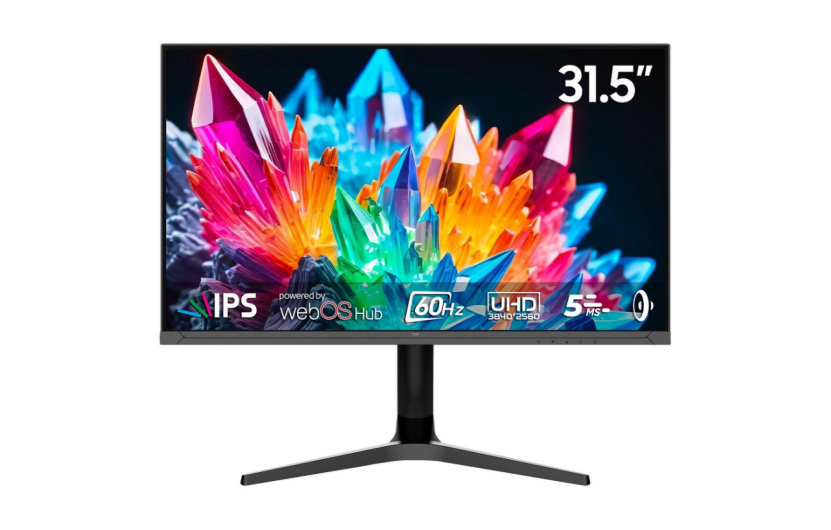
The Case for Built-in Smart Monitor Audio: Convenience Meets Integration
For the vast majority of daily tasks—from video conferencing and casual streaming to listening to background music while working—the integrated speakers within a high-quality smart monitor offer sufficient and highly convenient performance.
The primary argument for built-in audio lies in its design philosophy: integration. A smart monitor is engineered to be a self-contained unit, meaning the speakers are tuned and optimized for the display’s chassis and placement.
Key Advantages of Integrated Audio:
l Clutter Reduction: By eliminating the need for external components, power cables, and auxiliary connections, built-in speakers create a clean, minimalist desktop environment. This is particularly valuable for small office setups or home workstations where space is a premium.
l Optimized Performance: Modern display manufacturers, including NPC, often utilize proprietary acoustic tuning and digital signal processing (DSP) to maximize the limited space within the monitor chassis. While volume and bass depth may be restricted, the resulting audio profile is often clear, balanced, and perfectly adequate for dialogue-heavy content.
l Seamless Operation: The audio is immediately available upon turning on the display, requiring no separate power-ups or configuration. Features like volume control and source switching are natively handled by the monitor's remote or on-screen display (OSD).
For professionals conducting remote meetings or students attending virtual classes, the clarity of voice reproduction is paramount, and many built-in smart monitor systems excel in delivering crisp mids and highs necessary for clear communication.
The Quest for Fidelity: Why External Speakers Remain King
While integrated smart monitor audio has come a long way, it operates within immovable physical constraints that external speaker systems simply bypass. The laws of physics dictate that rich, deep bass and wide stereo separation require dedicated space—space that a slim monitor panel cannot provide.
When seeking the highest level of audio fidelity, particularly for immersive experiences like competitive gaming, film viewing, or critical music listening, an external setup is non-negotiable.
Types of External Audio Setups and Their Benefits:
Setup Type | Target Performance | Key Benefit |
Soundbars | Cinematic, Space-Saving | Wide soundstage, improved bass response via dedicated woofer/subwoofer (often wireless). |
2.0/2.1 Speaker Systems | Stereo Clarity, Music Focus | Accurate imaging (left/right channel separation), dedicated subwoofer for impactful low frequencies. |
5.1/7.1 Surround Systems | Deep Immersion, Gaming/Film | True positional audio, unparalleled spatial awareness and depth, ideal for large screens. |
External speakers achieve superior quality through:
1. Driver Size: Larger drivers (the cones that move air) can physically move more air, which is essential for producing low-frequency bass notes that add impact to explosions, soundtracks, and percussive music.
2. Cabinet Volume: Dedicated speaker cabinets are acoustically designed to prevent resonance and distortion, allowing sound waves to develop naturally before reaching the listener.
3. Amplification: External systems use dedicated, often more powerful, amplifiers to drive the speakers, resulting in higher maximum volume without distortion (headroom).
Smart TV Monitor Wireless Connectivity: The Foundation of Integration
The true differentiating factor for modern smart monitors, especially those based on advanced platforms like LG webOS—which powers the NPC Smart Monitor line—is not just the presence of speakers, but the quality of their connectivity.
A smart monitor must act as a central hub, and robust smart TV monitor wireless connectivity is key to resolving the built-in vs. external audio dilemma.
The NPC Smart Monitor series is engineered with comprehensive features that bridge this gap, offering users the flexibility to pivot between integrated convenience and external performance seamlessly:
Built-in webOS: The integrated LG webOS system allows for direct streaming, meaning the monitor processes audio independently of a PC. This is vital because the audio signal remains digital until the last possible moment, preserving quality.
1. Bluetooth Connectivity: The inclusion of Bluetooth Connectivity on the NPC Smart Monitor allows users to easily connect wireless peripherals. This means you can use an external soundbar, Bluetooth headphones, or compatible 2.1 speaker system without running a single cable from your PC or source device to the audio gear. This preserves the clean aesthetic while delivering better sound.
2. Screen Sharing & Remote PC Function: The integrated operating system ensures that whether you are using the monitor as a standalone streaming device, a cloud gaming portal, or a Remote PC terminal, the audio experience remains consistent and immediately accessible.
Ultimately, a smart TV monitor wireless setup gives the user the choice. The integrated speakers serve the convenience needs (office work, quick viewing), while the advanced wireless connectivity enables high-fidelity audio when demanded by a blockbuster film or an intense gaming session.
Conclusion: Making the Final Selection
The choice between the integrated audio of a smart monitor and an external speaker setup comes down to prioritizing one of two factors: streamlined convenience or uncompromised acoustic performance.
l Choose Integrated Audio if your priorities are a minimalist workspace, reduced clutter, primary use for dialogue (video calls, news), and casual entertainment.
l Choose External Speakers if you demand high cinematic immersion, powerful bass, precise positional audio for gaming, and critical music listening.
Fortunately, products like the NPC Smart Monitor with its integrated LG webOS system and built-in Bluetooth Connectivity offer the best of both worlds. They provide reliable, clear integrated sound for everyday tasks while ensuring effortless wireless connectivity to high-fidelity soundbars and speaker systems for those moments when audio immersion is paramount.


