

Assessing mobile computer hardware requires looking beyond promotional headline discounts to evaluate the functional balance between core components. Price reductions often conceal compromises in memory speed, storage throughput, or panel quality that undermine daily productivity.
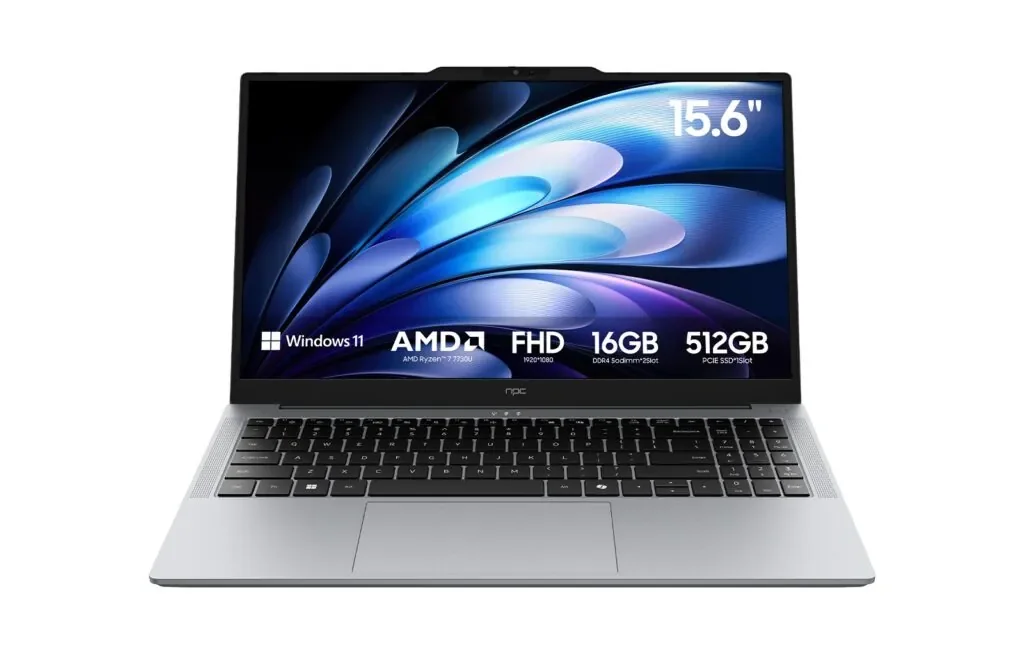
Successfully navigating windows laptop deals hinges on understanding how the processor, RAM, solid-state drive, and display panel coordinate to execute computing workloads.
Every operational duty depends on this internal synergy. A capable processor throttles when constrained by single-channel memory, while rapid storage cannot offset a dim, low-resolution screen. By breaking down how these four fundamental hardware elements govern responsiveness, buyers can distinguish genuine equipment value from superficial markdowns.
Processor Architectures and Task Execution Dynamics
The central processor serves as the engine directing all operational commands across system software. Selecting the right processing platform determines how cleanly a mobile machine compiles data sets, renders presentations, and handles background administrative tasks. Different computational approaches define the two leading silicon families available in contemporary configurations.
Intel Core platforms, including the 12th Gen i3-1215U alongside i5-1235U, i7, and Core Ultra series, utilize specialized thread management to prioritize single-core responsiveness. Lightweight administrative entries and direct software execution benefit from these concentrated clock frequencies. Individual enterprise applications run crisply without dragging system resources.
In parallel, AMD Ryzen processors such as the Ryzen 5 5500U, Ryzen 5 7430U, and Ryzen 7 7730U distribute heavy computational loads across dense multi-core layouts. Multi-threaded processing allows concurrent background activities, statistical indexing, and local data compilation to run simultaneously. Systems sustain steady calculation speeds across extended operational periods without encountering severe thermal throttling.
Memory Bandwidth and Multitasking Buffer Capacities
Random access memory operates as the active workspace holding immediate application data for the processor. When available memory capacity is exhausted, the operating system shifts overflow information to storage disks, creating latency and stalling active programs. Maintaining sufficient memory headroom ensures rapid transitions across complex software suites.
Equipping a system with 16 GB of system memory satisfies current multitasking requirements across commercial environments. Standard DDR4 modules running at 3200 MHz maintain stable data pipelines for office suites, web portals, and background cloud services. Stepping up to DDR5 architectures operating at speeds up to 5600MHz expands system bandwidth, transferring larger data blocks to the processor in fewer clock cycles.
Board design plays a decisive role in physical hardware longevity. Motherboards equipped with dual SO-DIMM slots allow operators to expand capacity up to 32 GB or 64 GB as software resource requirements climb over time. Selecting modular socketed memory shields organizations from premature machine obsolescence caused by soldered single-channel restrictions.
Storage Throughput and File Indexing Efficiency
Solid-state drives dictate system startup duration, application launch intervals, and file indexing performance. Traditional spinning disks relied upon mechanical read heads that introduced physical latency into every file request. Modern solid-state drives replace moving mechanisms with high-speed digital flash memory, eliminating mechanical read delays.
Deploying M.2 2280 PCIe solid-state storage gives processors direct access to data streams at high transfer rates. Capacities spanning 128 GB, 256 GB, 512GB, and 1TB configurations accommodate Windows 11 installation files alongside expansive business libraries. Operating systems boot in seconds, and massive spreadsheets open without frustrating read bottlenecks.
Supplementary storage flexibility adds operational convenience for mobile professionals. Chassis designs that include an integrated TF card reader allow operators to ingest field media and backup files without occupying main drive partitions. This interface preserves internal drive space for critical local software and operating system caches.
Visual Optics, Panel Ratios, and Screen Ergonomics
Display panels establish the physical viewing canvas between the computer hardware and the operator. Panel dimensions and resolutions dictate workspace organization, character sharpness, and visual comfort during prolonged work sessions. Form factors span portable 14-inch chassis weighing roughly 1.4kg up to expansive 15.6-inch, 16-inch, and 17.3-inch panels.
Panel technology shapes color stability and viewing comfort. In-Plane Switching (IPS) panels maintain consistent contrast and accurate color presentation across wide viewing angles, preventing the chromatic washout common on entry-level displays. Colleague reviews and shared presentation decks remain clear when observed from off-center angles.
Screen aspect ratios further influence daily desk productivity. Conventional 16:9 Full HD panels with 1920 by 1080 resolution provide dependable geometry for widescreen video and standard documents. Modern 16-inch formats featuring 16:10 ratios with 1920 by 1200 FHD or 2560 by 1600 QHD resolutions increase vertical screen real estate, reducing the need to scroll through spreadsheets and code documents.
Component Synergy and Strategic Hardware Assessment
Evaluating mobile systems requires examining how individual components balance against power delivery and peripheral needs. Discounted promotions occasionally pair strong processors with constrained memory or poor battery chemistry to post eye-catching prices. Scrutinizing the relationship between internal components prevents buyers from choosing flawed windows laptop deals that cause operational friction.
Battery capacity directly governs practical field productivity outside traditional office desks. Lithium-ion polymer packs rated at 45.6Wh or 55Wh sustain six to eight hours of typical runtime when paired with energy-efficient mobile processors. Balanced energy consumption prevents premature battery depletion during travel or remote operations.
Comprehensive input and output selection preserves connectivity across changing workspaces. Full-function Type-C interfaces, USB 3.2 Gen 1 ports, and standard HDMI outputs eliminate the need for cumbersome external dongles. Physical camera privacy switches, dual-band Wi-Fi, and resilient chassis engineering utilizing metal and structured polymers safeguard daily operations in transit.
Practical Procurement Realities and Manufacturing Standards
True mobile efficiency requires an intentional balance across silicon throughput, memory speed, drive latency, and optical ergonomics. Rather than compromising component tiers to fit promotional headlines, our factory operations at NPC integrate genuine Intel Core and AMD Ryzen architectures with dual-channel memory expansion, M.2 PCIe drives, and wide-view IPS panels from 14 to 17.3 inches.
Every laptop assembled across our production lines adheres to rigorous hardware inspections and comes backed by a 2-year warranty covering the complete chassis and core modules—including motherboards, processors, and screens—under standard operating conditions. Choosing NPC ensures direct factory access, customizable fleet specifications, and dependable technical support via official hotlines and service centers.
Reach out to the technical team at NPC to review detailed component datasheets, explore volume supply arrangements, or receive an immediate commercial hardware quotation tailored to your operational computing requirements.