

Allocating funds across integrated desktop components requires realistic trade-offs. Buyers working with restricted procurement allowances cannot simply max out every item on the specification sheet. Discovering the best budget all-in-one PC means identifying internal parts that maintain daily system responsiveness while bypassing unnecessary markups.
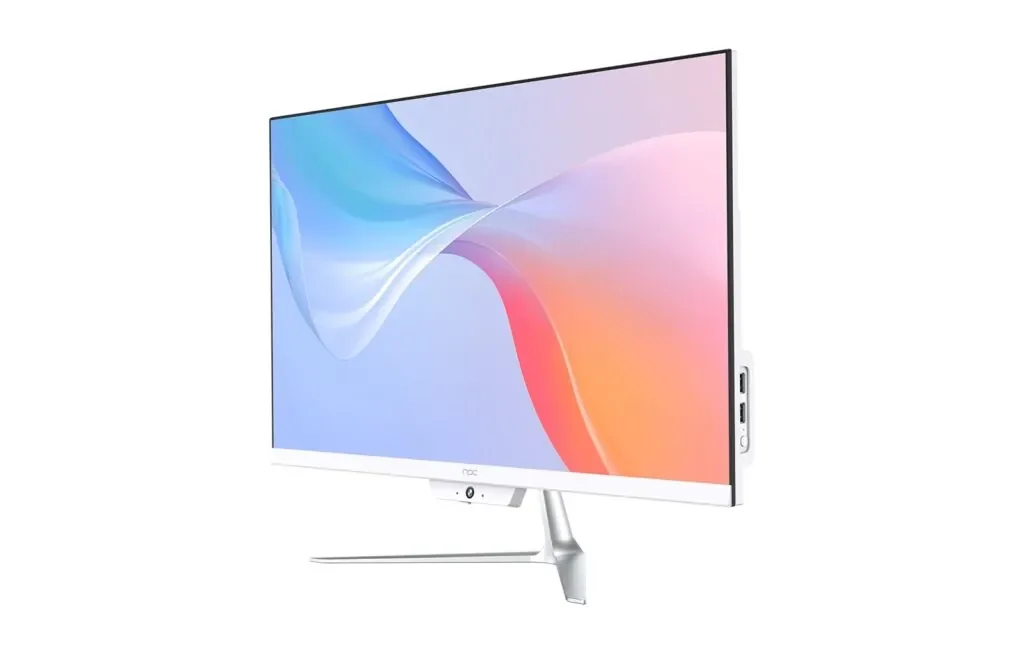
Integrated computers pack the processing unit, monitor, and speakers into a unified enclosure, lowering cable clutter and desk footprint. Compact form factors introduce thermal boundaries, making thoughtful component balance far more critical than purchasing raw peak wattage.
Smart budget planning focuses funds on components that prevent system slowdowns during everyday multitasking. Spending heavily on premium aesthetics or oversized panels often leaves users with insufficient operational memory or sluggish storage.
Directing money toward essential hardware foundations prevents common computing bottlenecks. Understanding which technical specifications drive productivity helps buyers build practical setups that remain functional over multi-year operational cycles.
Processor Architecture: Balancing Mobile Efficiency and Multi-Core Value
Central processors establish how smoothly an integrated machine manages simultaneous spreadsheets, video calls, and web browsing. Budget-conscious purchasers frequently choose between mobile-derived laptop processors and desktop computing silicon.
Mobile processor options, running within a thermal design power range of 15W to 35W, generate less heat within slim chassis housings. Lower thermal output allows quiet, stable cooling while handling everyday office workflows, document drafting, and video meetings without aggressive fan noise.
Cost-conscious buyers seeking dependable multi-core execution often prioritize AMD CPU configurations, which deliver strong parallel processing value for multitasking routines. Alternatively, mainstream Intel Core i5 architectures, such as 12th or 13th generation platforms, provide reliable application compatibility for routine corporate software suites.
Opting for desktop-grade processors with dual heat pipes and cooling fans increases overall device cost and power consumption. Unless daily workloads involve heavy 3D rendering or continuous file compression, mobile processor architectures offer a practical cost-to-performance balance on tight budgets.
System Memory and Storage: Prioritizing Baseline Capacity Over Raw Clock Speeds
System memory dictates how many browser tabs and corporate tools stay active before background applications freeze. Running modern business operating systems on less than 16 GB of RAM quickly leads to noticeable interface stutter during regular work routines.
Securing a 16 GB DDR4 memory module running at 3200 MHz provides smooth operation across split-window workflows. Motherboards equipped with dual SO-DIMM slots permit future memory expansion up to 64 GB, prolonging hardware utility without requiring high initial expenditure.
Solid-state storage represents another non-negotiable specification for budget-focused buyers. Mechanical hard drives create severe boot delays and sluggish file access, making high-speed solid-state drives mandatory for productive computing.
Selecting an M.2 2280 NVMe SSD with 512 GB capacity delivers rapid startup sequences and swift application loading times. While smaller 128 GB or 256 GB drives slightly lower purchase prices, 512 GB units provide adequate headroom for software updates and local project assets without demanding auxiliary external drives.
Storage flexibility supporting PCIe 3.0 or SATA interfaces allows cost-effective drive replacements if data requirements grow over time. Prioritizing internal storage speed over cosmetic case lighting keeps budgets aligned with actual speed gains.
Display Form Factors: Optimal Sizing and 100 Hz Refresh Dynamics
Panel dimensions dramatically influence both the total purchase price and personal desk comfort. Compact 21.5-inch displays fit restricted workspaces and student dormitories, while 23.8-inch screens offer a balanced viewing standard for typical office environments.
Full HD 1080p resolution (1920×1080) delivers crisp character legibility across 21.5-inch and 23.8-inch panels without inflating manufacturing costs. Budgeting for 2K QHD or 4K resolutions on larger 27-inch displays increases costs and demands greater graphical processing capabilities that basic office workloads do not require.
Refresh rates also impact daily visual comfort during sustained screen sessions. Mainstream displays featuring a 100 Hz refresh rate deliver noticeably smoother cursor movements and fluid document navigation compared to standard 60 Hz panels.
Evaluating a best budget all-in-one PC involves favoring responsive 100 Hz 1080p panels over expensive ultra-high-resolution screens. That allocation delivers tangible comfort improvements during daily scrolling without exceeding sensible financial limits.
Port Utility and Ergonomics: Essential Connectivity Over Costly Add-Ons
External connectivity must accommodate standard desktop peripherals without requiring separate USB expansion hubs. Practical configurations provide two USB 3.0 ports for fast external storage alongside a USB 2.0 connection for input devices.
Video outputs like HDMI, DisplayPort, or analog VGA ports add valuable operational flexibility for secondary monitors or meeting room projectors. Having standard video outputs permits modular dual-screen setups as business needs expand.
Wired RJ45 Ethernet ports provide stable network connections for corporate tasks, reducing latency fluctuations and signal drops common to crowded wireless frequencies. Connecting directly to local networks maintains steady file transfers and video conferences.
Built-in peripherals like a 3.0MP webcam and integrated speakers handle virtual collaboration out of the box, removing separate accessory costs. Dedicated DC power connections relying on factory-standard adapters protect internal motherboards from irregular electrical fluctuations.
Support bases offer another functional decision point. While standard stationary bases save capital on initial rollouts, height-adjustable stands allow workers to modify screen elevation to ease neck strain during lengthy operational shifts.
Integrated Manufacturing and Commercial Procurement
At NPC, we design and produce integrated desktop computers engineered to give distributors and enterprise buyers practical hardware value. Production lines manufacture all-in-one systems across 21.5-inch, 23.8-inch, 24.5-inch, and 27-inch sizes, pairing cost-efficient AMD and Intel processors with 16 GB DDR4 memory and M.2 solid-state storage.
Operating ISO 9001 and ISO 14001 certified facilities, NPC backs shipments with a two-year whole-machine warranty covering motherboards, CPUs, memory, displays, and power adapters under normal operating conditions.
Partnering with NPC provides commercial clients with direct access to customizable hardware configurations, competitive wholesale pricing, and reliable after-sales support. Contact our sales engineering team today to review technical specifications, evaluate sample units, and discuss tailored production schedules for your desktop fleet.