

Choosing business computing equipment involves more than comparing processor specifications. The physical architecture of a computer can affect workspace requirements, installation, connectivity, maintenance, and the overall user experience. An all-in-one system computer brings the display and primary computing hardware together in one enclosure, while a conventional desktop normally separates the monitor from the computer chassis. Understanding this distinction can help business buyers select equipment according to specific application and deployment needs.
What Is an All-in-One System Computer?
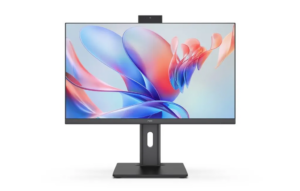
An all-in-one PC integrates the main computing components behind or within the display instead of placing them in a separate desktop tower. Depending on the model, the integrated enclosure can contain the motherboard, processor, memory, storage, camera, wireless modules, speakers, and power-related components.
This approach creates a compact workstation with fewer separate devices. Businesses can benefit from a cleaner desk arrangement and potentially simpler deployment, particularly where space is limited. Reception counters, offices, classrooms, retail environments, and service desks are examples of settings where reducing equipment clutter can be useful.
However, integration also means that the internal design needs to be carefully coordinated. Thermal management, component placement, power delivery, and access to ports all have to work within the physical constraints of the display enclosure.
How Does It Differ From a Traditional Desktop?
The most obvious difference is the physical separation of components. A traditional desktop PC generally uses a separate tower or small-form-factor chassis connected to an external monitor. This modular arrangement makes it possible to replace or upgrade individual components independently.
An all-in-one system takes the opposite approach. The computer and screen are designed as one product, so the display and computing platform are purchased together. This can simplify workstation setup, but it may provide less flexibility for replacing individual hardware components compared with a conventional desktop configuration.
For business purchasers, the appropriate architecture depends on priorities. Organizations requiring highly customizable hardware may prefer a modular desktop, while businesses emphasizing space efficiency and straightforward deployment may consider an integrated solution.
Display Size and Resolution Still Matter
Because the monitor is built into the system, display specifications are an important part of evaluating an all-in-one system computer. Screen size affects physical footprint, while resolution influences how much detail users can see and how much workspace can be displayed.
The NPC PF2703-M features a 27-inch screen with a 1920 × 1080 resolution and a 100Hz refresh rate. Its specified brightness is 250±20 Lux. This configuration provides a large Full HD workspace suitable for common office tasks, web-based applications, communication, and general multimedia use.
For business buyers, a 27-inch display can be useful when users regularly work with multiple windows or information-heavy interfaces. Full HD also represents a practical resolution for organizations that do not require higher-resolution professional displays.
Processing Hardware Fits Behind the Screen
A key engineering challenge is fitting computing hardware into the same physical structure as the display. The processor, motherboard, memory, and storage must operate within the enclosure while maintaining appropriate power and thermal characteristics.
The NPC PF2703-M uses an Intel® Core™ i5-13420H processor, paired with 16GB of SO-DIMM DDR4 memory running at 3200MHz. Storage is provided by a 512GB M.2 2280 SSD.
This configuration illustrates how an integrated computer can combine mainstream computing hardware with a relatively compact physical design. For office deployments, such specifications can support everyday productivity applications, document work, web browsing, communication, and multitasking.
Connectivity Becomes Part of the Integrated Design
Connectivity is another area where the two architectures can differ. Traditional desktop systems often provide numerous ports on the tower, while an integrated computer needs to position its interfaces conveniently around a much more compact chassis.
The NPC PF2703-M includes a 5.0MP camera, while an M.2 Wi-Fi module supporting PCIe + USB and CNVi is available as an optional configuration. This approach allows businesses to select wireless capability according to their deployment requirements.
For companies purchasing computers in volume, configuration flexibility can be particularly relevant. Different offices, markets, or customer groups may have different networking requirements, making optional components useful when building a broader product portfolio.
Which Applications Suit an Integrated Design?
An all-in-one system computer can be particularly practical where workspace organization and installation simplicity are important. Office desks can benefit from fewer separate components, while reception areas and customer-facing counters can maintain a more organized appearance.
Traditional desktops remain relevant where organizations need extensive hardware customization, dedicated graphics configurations, or frequent component replacement. Their modular architecture can make individual upgrades more straightforward.
Neither architecture is universally applicable. Business buyers should consider the intended workload, available space, maintenance model, purchasing budget, and expected service life before selecting a platform.
What Should Business Buyers Evaluate?
A thorough procurement review should go beyond the question of whether a computer is integrated. Buyers should examine processor performance, memory capacity, storage type, display specifications, connectivity, camera capability, physical dimensions, and available configurations.
For all-in-one system computer procurement, businesses should also consider how the equipment will be installed and supported after delivery. A compact design can simplify physical deployment, but buyers should still confirm warranty arrangements, technical documentation, configuration options, and supplier support.
At NPC, we develop computing products with these practical considerations in mind. Our product portfolio covers smart TVs, monitors, and computing solutions, allowing us to address different requirements across commercial and consumer-oriented environments.
Bringing Computing and Display Together at NPC
At NPC, we are a technology manufacturing enterprise specializing in smart TVs, monitors, and computing products. We develop integrated computing solutions that combine display technology with processing hardware, memory, storage, camera functionality, and connectivity within a unified platform.
Our NPC PF2703-M combines a 27-inch Full HD 1920 × 1080 display, 100Hz refresh rate, Intel® Core™ i5-13420H processor, 16GB DDR4 memory, 512GB M.2 2280 SSD, 5.0MP camera, and optional M.2 Wi-Fi configuration. For businesses evaluating an all-in-one system computer, we welcome distributors, retailers, office-equipment suppliers, and other commercial partners to contact NPC and discuss suitable computing solutions for their markets and applications.