







At NPC, we understand how a super wide curved gaming monitor can transform both gaming and business setups. As a leading innovator in the tech industry, we specialize in producing high-quality monitors designed to enhance user experience, whether you're working, gaming, or multitasking. In this article, we'll share best practices for positioning your super wide curved gaming monitor for optimal performance, while highlighting how NPC's cutting-edge designs and technical support can help you achieve the best possible setup.
Understand Users' Workspace Layout for Optimal Viewing
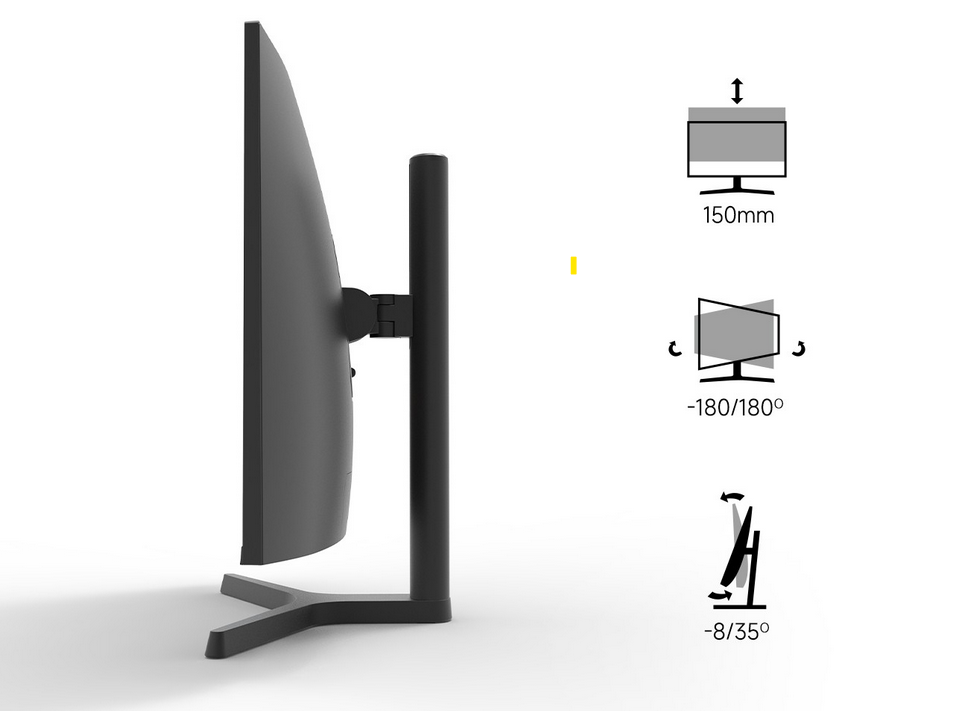
When setting up a super wide curved gaming monitor, it's essential to understand how the workspace layout influences the viewing experience. A well-positioned monitor enhances comfort and reduces eye strain, which is crucial for both gamers and professionals. For the best experience, we recommend placing NPC monitor at a distance that allows users to enjoy its expansive screen while maintaining ergonomic alignment. Positioning the monitor at the right height is key. Ideally, the center of the screen should be at eye level, and the monitor should be angled slightly towards users to reduce neck strain. The curved design of our NPC super wide gaming monitors ensures that the screen wraps around users' peripheral vision, providing a more immersive and engaging experience.
Align Monitor for Seamless Multi-Tasking and Immersive Gaming
Whether users are in a fast-paced gaming environment or handling multiple tasks in a business setting, aligning their super wide curved gaming monitor properly is essential for maximizing productivity. With a screen that stretches across their entire field of view, NPC's super wide monitors provide seamless multitasking. The curvature of the display helps them manage multiple windows simultaneously without the need for multiple monitors. In gaming, this alignment enhances immersion, allowing users to feel fully integrated into the experience. By adjusting the monitor's height and tilt, they can also reduce glare and reflections, ensuring clear visuals even in brightly lit spaces. For business use, this creates the perfect environment for detailed design work, video conferencing, or financial modeling.
Enhance Users' Gaming Experience with Proper Monitor Calibration
Once super wide curved gaming monitor is in place, it's time to fine-tune it for the best performance. Proper calibration is crucial, especially for high-performance gaming. With NPC's advanced monitors, we offer built-in features that allow for easy color calibration, contrast adjustments, and brightness controls. These settings can optimize visuals for both gaming and professional work, ensuring that the display is clear, vibrant, and true to life.
For gamers, our super wide curved monitors are equipped with high refresh rates and fast response times, providing a smooth and lag-free gaming experience. For business environments, accurate color reproduction and crisp visuals help users work with confidence, whether they're reviewing designs or presenting to clients.
Conclusion
Positioning a super wide curved gaming monitor correctly is essential to getting the most out of its features, whether users are using it for gaming or business tasks. At NPC, we're committed to offering high-quality products with cutting-edge technology to meet the demands of both casual and professional users. Our super wide curved gaming monitors are designed to enhance users' workspace, boost productivity, and create an immersive experience like no other. With over 19 years of experience in the electronics industry, we provide not only superior products but also excellent technical support to ensure users' complete satisfaction. Whether you're a wholesaler, trader, or global brand seeking to source monitors, projectors, or all-in-one PCs, NPC offers the innovation, quality, and service you can trust.


