







When it comes to immersive gaming experiences, a wide curved gaming monitor is an frontier innovator. At NPC, we understand how crucial it is to have the right equipment for optimal performance. Our wide curved gaming monitors are designed to enhance users' purchase experience with advanced features and cutting-edge technology. In this article, we will introduce how to optimize users' NPC wide curved gaming monitor for maximum performance, ensuring users' gaming session is smooth and enjoyable.
Adjust Display Settings for Optimal Gaming Performance with NPC Monitors
The first step to optimizing your wide curved gaming monitoris to adjust your display settings to match the game you're playing. Our NPC monitors come equipped with Cinematic color gamut and HDR (High Dynamic Range), which provide richer colors and deeper contrasts, giving users a more vivid gaming experience. By tweaking the brightness, contrast, and resolution, users can enhance clarity and ensure that dark scenes are visible without being too bright. One feature that sets our wide curved gaming monitors apart is the ability to fine-tune settings for different types of content. Whether the users playing fast-paced FPS games or enjoying visually stunning RPGs, NPC's display technology allows users to optimize their monitor to suit any scenario, making their experience both comfortable and visually stunning.
Enable Refresh Rate and Response Time Features on Your NPC Gaming Monitor
When it comes to gaming, refresh rate and response time are key factors for fluid and responsive gameplay. A higher refresh rate ensures that your monitor can display more frames per second, giving you smoother gameplay and reducing motion blur. Our wide curved gaming monitors from NPC support high refresh rates, making them ideal for competitive gaming. Additionally, the low response time technology in our monitors ensures that your inputs are reflected instantly on the screen, minimizing any delay between your action and the result. This is especially important for fast-paced games where milliseconds can make all the difference. Whether you're playing a high-speed racing game or an intense battle royale, NPC monitors give you the edge you need.
Position Your NPC Wide Curved Gaming Monitor for an Ergonomic Gaming Setup
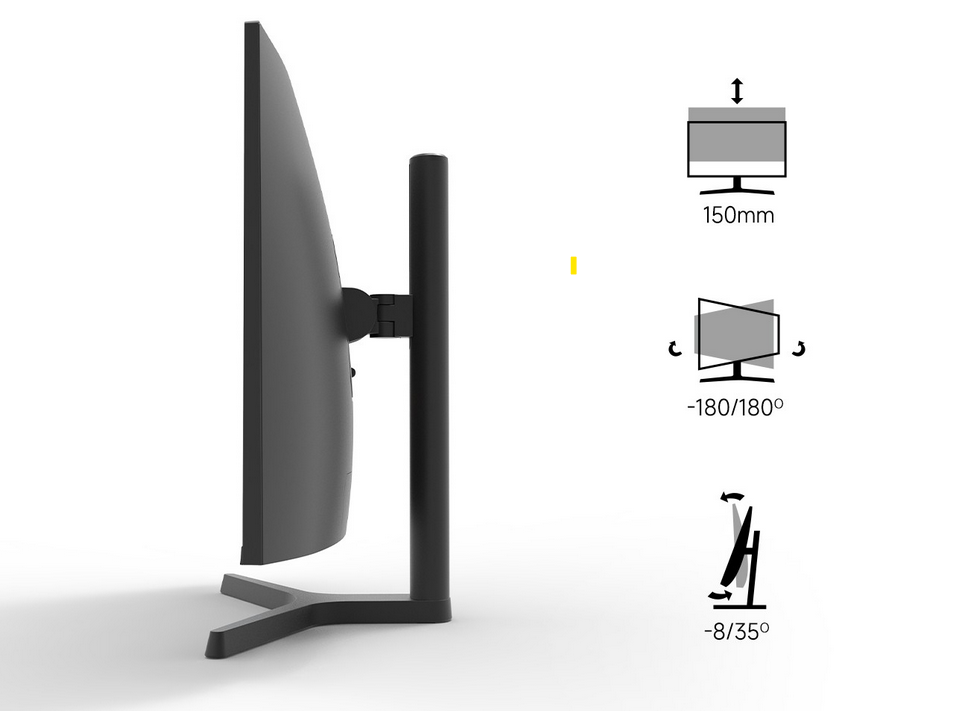
Proper monitor positioning is essential for comfort and performance during long gaming sessions. A wide curved gaming monitor like those from NPC is designed to enhance your peripheral vision, making users' gaming experience more immersive. However, it's important to position the monitor correctly to avoid strain on your neck and eyes. Our NPC wide curved gaming monitors come with ergonomic adjustments, including tilt and height settings, allowing you to find the most comfortable viewing angle. The curved screen is designed to match the natural curve of your eyes, reducing distortion and making it easier to focus on the game without straining. By positioning your monitor at the right angle and height, users can ensure maximum comfort and improve your overall gaming performance.
Conclusion
Optimizing your wide curved gaming monitor is essential for achieving the best performance, and NPC makes it easy with our innovative technology and ergonomic designs. From adjusting display settings for better visuals to enabling the perfect refresh rate for smooth gameplay, we ensure that our wide curved gaming monitors give you a competitive edge. Our commitment to technical support and continuous innovation means you'll always have the tools you need for an optimal gaming experience.


